

In 1997, the first internationally sanctioned wireless LAN standard, 802.11 was approved by IEEE. This standard proposed three type of implementation for the physical layer (OSI layers) which is:
The IR method was not commercially implemented while the RF method suffers from low transmission speeds (2 Mbps). Further developments were made on the original 2.4 GHz band, using more sophisticated spectrum technologies. The 802.11b standard was established in 1999, which was able to deliver raw data rates up to 11 Mbps, was widely adopted in the commercial market.
A wireless LAN extends the limited reach of traditional wired networks inside a building or office by enabling network communication to occur over the air as shown in Figure 1. In the office environment, a wireless network offers end-users the benefits of increased mobility and increased productivity, because it enables mobile users to access information and network resources as they attend meetings, collaborate with other users, or move to other locations in the office. Additionally, it may bring cost savings to the organisation by enabling network connectivity at locations that are too difficult and costly to install physical cabling.

Wireless
technologies conform to a variety of standards and offer varying levels of
security features. The principal advantages of standards are to encourage mass
production and to allow products from multiple vendors to interoperate. For this
document, the discussion of wireless standards is limited to the IEEE 802.11 and
the Bluetooth standard. WLANs follow the IEEE 802.11 standards. Ad hoc networks
follow proprietary techniques or are based on the Bluetooth standard, which was
developed by a consortium of commercial companies making up the Bluetooth
Special Interest Group (SIG). These standards are described below.
WLANs
are based on the IEEE 802.11 standard, which the IEEE first developed in 1997.
The IEEE designed 802.11 to support medium-range, higher data rate applications,
such as Ethernet networks, and to address mobile and portable stations.
802.11
is the original WLAN standard, designed for 1 Mbps to 2 Mbps wireless
transmissions. It was followed in 1999 by 802.11a, which established a
high-speed WLAN standard for the 5 GHz band and supported 54 Mbps. Also
completed in 1999 was the 802.11b standard, which operates in the 2.4 - 2.48 GHz
band and supports 11 Mbps. The 802.11b standard is currently the dominant
standard for WLANs, providing sufficient speeds for most of today’s
applications. Because the 802.11b standard has been so widely adopted, the
security weaknesses in the standard have been exposed. These weaknesses will be
discussed in Section 3.3.2. Another standard, 802.11g, still in draft, operates
in the 2.4 GHz waveband, where current WLAN products based on the 802.11b
standard operate.4
Two
other important and related standards for WLANs are 802.1X and 802.11i. The
802.1X, a port-level access control protocol, provides a security framework for
IEEE networks, including Ethernet and wireless networks. The 802.11i standard,
also still in draft, was created for wireless-specific security functions that
operate with IEEE 802.1X.
Bluetooth
Bluetooth has emerged as a very popular ad hoc network standard today. The Bluetooth standard is a computing and telecommunications industry specification that describes how mobile phones, computers, and PDAs should interconnect with each other, with home and business phones, and with computers using short-range wireless connections. Bluetooth network applications include wireless synchronization, e-mail/Internet/intranet access using local personal computer connections, hidden computing through automated applications and networking, and applications that can be used for such devices as hands-free headsets and car kits. The Bluetooth standard specifies wireless operation in the 2.45 GHz radio band and supports data rates up to 720 kbps.5 It further supports up to three simultaneous voice channels and employs frequency-hopping schemes and power reduction to reduce interference with other devices operating in the same frequency band. The IEEE 802.15 organization has derived a wireless personal area networking technology based on Bluetooth specifications v1.1.
The
Importance of Using WLAN Security
Just as in wired networks, no one can guarantee a completely secure networking environment that will prevent all penetrations at all times. Security protection is dynamic and ongoing—not static. Network managers and WLAN manufacturers need to keep one step ahead of the hackers.
Security experts recommend that enterprises deploy several layers of defense across the network to mitigate threats. Additional security components might include firewalls, intrusion-detection systems (IDSs), and virtual LANs (VLANs). Network managers also reduce risk by wisely designing and installing their wireless networks, by implementing proven security measures, and by using products and software developed by experts in network security. As an industry leader in network security, Cisco is an excellent choice for WLAN implementation. With the award-winning security features of the Cisco Wireless Security Suite, network managers can decrease risks to their network and increase WLAN security.
As previously discussed in this chapter, wireless
security can be difficult to achieve. Where wireless networks exist there is
little security. This has been a problem from the earliest days of WLANs.
Currently, many administrators are weak in implementing effective security
practices.
A
number of new security solutions and protocols, such as Virtual Private
Networking (VPN) and Extensible Authentication Protocol (EAP) are emerging. With
EAP, the access point does not provide authentication to the client, but passes
the duties to a more sophisticated device, possibly a dedicated server, designed
for that purpose. Using an integrated server VPN technology creates a tunnel on
top of an existing protocol such as IP.
VPN
technology effectively closes the wireless network since an unrestricted WLAN
will automatically forward traffic between nodes that appear to be on the same
wireless network. WLANs often extend outside the perimeter of the home or office
in which they are installed and without security intruders may infiltrate the
network with little effort. Conversely it takes minimal effort on the part of
the network administrator to provide low-level security to the WLAN.
All wireless computer systems face security threats that can compromise its systems and services. Unlike the wired network, the intruder does not need physical access in order to pose the following security threats:
Eavesdropping. This involves attacks against the confidentiality of the data that is being transmitted across the network. In the wireless network, eavesdropping is the most significant threat because the attacker can intercept the transmission over the air from a distance away from the premise of the company.
Tampering. The attacker can modify the content of the intercepted packets from the wireless network and this results in a loss of data integrity.
Unauthorized access and spoofing. The attacker could gain access to privileged data and resources in the network by assuming the identity of a valid user. This kind of attack is known as spoofing. To overcome this attack, proper authentication and access control mechanisms need to be put up in the wireless network.
Denial of Service. In this attack, the intruder floods the network with either valid or invalid messages affecting the availability of the network resources. The attacker could also flood a receiving wireless station thereby forcing to use up its valuable battery power.
Other security threats. The other threats come from the weakness in the network administration and vulnerabilities of the wireless LAN standards, e.g. the vulnerabilities of the Wired Equivalent Privacy (WEP), which is supported in the IEEE 802.11 wireless LAN standard.
SECURITY GUIDELINES FOR WIRELESS LAN
The following are some of the guidelines that could help to reduce the exposure of a network to the above security threats:
The access points should be properly secured within the office environment to prevent them from any unauthorized access and physical tampering. These access points should be placed in a well accessible location to allow easy security setting and maintenances especially if the company has a few hundreds of these access points to support.
To avoid interferences to its services, these access points should be physically located away from external sources of electromagnetic interference, e.g. microwave ovens. In additional, they should be waterproof for external installation.
Information Confidentiality and Integrity
The IEEE 802.11b standard allows for an optional privacy facility known as Wired Equivalent Privacy (WEP). The technique uses shared keys and a pseudo random number (PRN) as an initial vector (IV) to encrypt the data portion of network packets. This is based on the use of secret keys with symmetric encryption algorithms. The 802.11b wireless LAN network headers (including the IV portion and key number) themselves are not encrypted. This is one of the vulnerability, which an attacker could exploit. Although the standard specifies support for the popular RC4 symmetric stream cipher, all new symmetric key encryption efforts should be based on the AES block cipher in Offset Codebook Mode. The OCB has been optimised to minimize the number of calls to lower level cryptographic primitives, and can both encrypt/decrypt and tag/verify a message in a single pass.
With the recent discoveries of the WEP vulnerability, the WEP encryption should not be used as the only form of protection. Confidential or important information should be encrypted prior to transmission over the wireless LAN so as to protect its confidentiality and integrity. In additional, cryptographic hashing function such as MD-5 or SHA-1 can also be used to ensure the integrity of the information transmitted over the wireless LAN.
The symmetric encryption keys, e.g. the WEP keys stored in the access points and wireless station, should be protected from unauthorized access. The unauthorized intruder could use the encryption keys to decipher the wireless LAN data traffic. When in operation, the default WEP encryption keys should be changes and these keys should be changed on daily to weekly basics.
While existing wireless LAN products support WEP services using 40- or 64-bits keys, newer one can support the use of longer and more secure 128-bit keys. However, the longer keys may impact the overall performance of the wireless LAN.
The symmetric encryption keys should be protected during the key distribution to the users. The new keys should be send to the users either in encrypted form or through other secure means to prevent unauthorized access to the keys.
Instead on relying on the shared static symmetric base key, a session key tie to a particular session could be generated for the symmetric encryption. The advantages for these arrangements are:
However, the session keys are still subject to spoofing if the base key is revealed to an intruder.
Currently, only the Service Set Identifiers (SSID) and MAC address are the access control mechanisms supported by the wireless LAN technology, only verify authorized wireless stations but not the users. As such, unauthorized personnel can gain access to the wireless LAN and its network resources using a stolen wireless station.
To
authenticate the identity of the users accessing the wireless LAN, user
authentication mechanisms such as users’ ids/passwords, smart cards, security
token (e.g. RSA SecurID two-factor authenticator) should be used to stop
unauthorized access to the company’s internal network via the wireless LAN.
In addition to the above SSID and MAC access control mechanism, which are built into the IEEE 802.11 wireless LAN standard, the following mechanisms should be employed to further enhance the security of a wireless LAN:
Wireless network access ID. Most wireless LAN products allow the configuration of a user-defined access ID that can be used to further restrict access of the radio adaptors to the specific access points. Only when the access ID is the same can the adapter connect to that access point and join the cell. However, every access point and adapter can only use one network ID. This is unlike WEP which allows every access point and adapter to be configured to use different secret keys for different transmissions.
Ethernet/MAC
address restriction. Every Ethernet adapter has a
unique universal 12-digit hexadecimal MAC address and the wireless adapter has
one too. This IEEE-controlled hardware address can be used to identify the
wireless client on the network. We can make use of this “feature” by
configuring each access point to only accept connections from adapters with
registered MAC addresses. This provides a certain degree of security against
unauthorized access. However, MAC addresses can still be spoofed, so this should
not be used on its own but in combination with the other mechanisms to further
reduce the likelihood of unauthorized access to the wireless LAN.
Network authentication. A good network operating system, such as Novell, Windows NT/2000, minimally requires the user to log on by supplying a correct user ID and password before he can gain access to the network. Wireless LAN users should be required to do the same.
Firewall access control. Access control mechanisms such as firewalls should be implemented to segregate the wireless LAN from the internal wired network (Figure 2). The wireless LAN should be deployed in a different network segment, which is separate from the internal wired network. Network or IP filtering can be implemented at the gateway to ensure that only authorized network traffic from the wireless LAN or legitimate access points are allowed to enter the wired network. This is to prevent unauthorized access to the internal wired network via rogue access points.
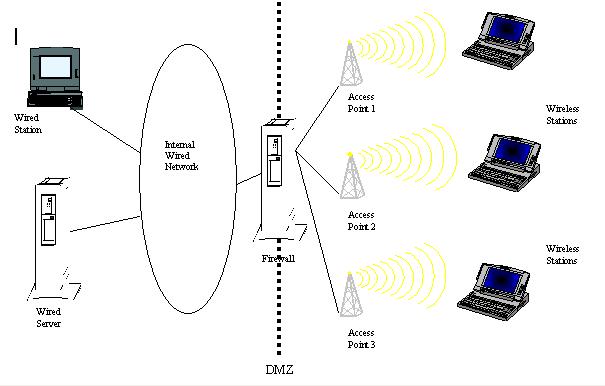
Figure 2: How a firewall is used to segregate the wireless LAN from the internal wired network
On the client wireless station, access control and intrusion detection mechanisms should be installed where possible to prevent and detect any unauthorized access over the wireless LAN. The attacker may compromise on the client station and uses it to access the internal wired network.
The user’s privileges and access rights to the systems and network resources should be restricted if they access the wireless LAN using client computing devices where there are no controls available, e.g. PDAs.
Software programs that can be used to configure the wireless station as access point should not be allowed so as to minimise the set-up of rogue access points. This is to prevent unauthorized access to the internal wired network via the rogue access point due to insecure configurations (e.g. WEP not enabled, no MAC address control list).
An access point authenticates a user, but a user does not and cannot authenticate an access point. If a rogue access point is placed on a wireless LAN, it can be a launch pad for denial-of-service attacks through the “hijacking” of the wireless station of legitimate users. Mutual authentication supported by the access point allows the mutual authentication between the client and the authentication server, where both sides prove their legitimacy. Mutual authentication also makes it possible to detect and isolate rogue access points.
The wireless station should also not be configured for network file sharing without any protection to prevent any unauthorized access to his local files.
Users within the company premise should not be allowed to set up their wireless stations in ad-hoc mode and communicate with each other without going through the access point. This is to prevent unauthorized access to the user’s files if they are not protected.
The user should power down the wireless station when it is not being used for a long period of time, e.g. after office hours. This will reduce the risk of attacks on the wireless station over the wireless LAN. When the user’s wireless station has made connected to the internal wired network, it should not have concurrent direct connection to any untrusted network, e.g. the Internet. This is to prevent any unauthorized access to the internal wired network via the wireless station.
Only administrators have access to the wireless LAN key distribution program for the distribution of the encryption keys. The built-in COM ports of the access point should be disabled or password-protected to prevent any unauthorized access to the access points. All unnecessary services and ports in the access points should be removed or closed.
Periodic scanning on the wireless LAN should be conducted to detect the presence of rogue access points, unauthorized ports/services or any security vulnerabilities in the network. Prior to the scanning process, written approval should be obtained from the management to allow the vulnerabilities scanning on the network.
The password for remote management of access points can be captured and used to gain unauthorized access to the access points. As such, administration of access points should not be done over the wireless LAN. Instead, the access points should be administrated via the wired network or locally via the access point’s built-in COM ports.
It is commonly to statically assign a WEP key to a client, either on the client’s disk storage or in the memory of the client’s wireless LAN adapter. When a wireless station is lost, the intended user of the wireless station no longer has access to the MAC address or WEP key, and an unintended user does. This should be reported immediately to the network administrator. This would allow prompt action to be taken to prevent any unauthorized access via the lost wireless equipment, e.g. render the MAC address and WEP key useless for wireless LAN access and decryption of transmitted data. The administrator must recode static encryption keys on all clients that use the same keys as the lost or stolen wireless station. The greater the number of clients, the larger the task of reprogramming WEP keys. To overcome this limitation is a security scheme that:
Spread spectrum was developed during World War II to provide security for military radio communications. It spreads a signal across a wide range of frequencies at very low power, transforming the original signal into a noise-like signal. This hides the signal and makes it difficult for the signal to be detected. In fact, spread spectrum was designed to be resistant to noise, interference, jamming and unauthorized detection, making this technology ideal for wireless networking. There are two main types of spread spectrum techniques: Direct Sequence Spread Spectrum (DSSS) and Frequency Hopping Spread Spectrum (FHSS).
Each of the above spread spectrum techniques has its pros and cons and the IEEE 802.11b standard supports both of them. Both DSSS and FHSS make it hard for anyone to intentionally or unintentionally intercept or jam the radio transmissions in a wireless LAN. To someone who does not have the correct frequency information, spread spectrum transmissions look no different from static or background noise. It is therefore difficult to “wiretap” a wireless LAN and directly observe the raw data being carried in the network. Likewise, it is difficult to jam a spread spectrum transmission. To do that without knowing the correct frequency information, you will need to generate a signal that is strong enough to jam the entire frequency band.
In comparison, FHSS is more secure and is therefore used more extensively in the military. This is because the carrier frequency used in DSSS is fixed and the security provided by the DSSS chipping code is limited. However, DSSS has better bandwidth (currently from 2 Mbps up to 11 Mbps) and range and is much more resilient to interferences than FHSS. DSSS is therefore more widely implemented in commercial wireless LAN products.
The wireless LAN is still vulnerable to denial of service attacks such as network jamming. As such, it should not be used as the only means to access the company’s network and systems. In situation where there is a risk of a particular access point being inaccessible due to flooding of network packets, load balancing across multiple access points should be implemented to mitigate this vulnerability.
Logging of the wireless LAN helps to detect unauthorised network traffic, e.g. using Intrusion Detection System, to detect attacks directed over the wireless LAN. Logging information such as source/destination IP addresses, MAC addresses, user’s logon names/ids and logon time/duration can be logged to aid analysis and investigation in the event of network problem. On periodical basics, audit should also be performed to detect any exceptions or abnormal network activities and alert should be sent to the network administrators.
Table
1 summarises how all the above security mechanisms work together to reduce the
vulnerability of a wireless LAN against the specific threats of eavesdropping,
tampering, unauthorized access and spoofing, and denial of service.
Protective
Mechanism
Threat
|
Spread Spectrum
|
WEP Encryption
|
Wireless Network Access ID
|
Network Authen-tication
|
Ethernet Address Restriction
|
Eavesdropping
|
ü
|
ü
|
|
|
|
Tampering
|
ü
|
ü
|
|
|
|
Unauthorized Access & Spoofing
|
|
ü
|
ü
|
ü
|
ü
|
Denial of Service
|
ü
|
|
|
|
|
Table 1: Summary of the key security mechanisms that can be implemented in a wireless LAN.
RECOMMENDATION
In view of the major WEP vulnerabilities and security threats posed by wireless LAN, confidential or important information should not be transmitted unprotected over the wireless LAN. When there is a need to transmit such information via the wireless LAN, further control measure such as end-to-end encryption should be used to ensure the confidentiality and integrity of the information. This is also another mechanism that helps to ensure the confidentiality of the information. This is the virtual private network (VPN) that runs transparently over a wireless LAN. Another security feature of the VPN is that it allows authentication, which ensures that only authorized users can connect, send and receive information over the wireless LAN.
There is also a need to treat the wireless LAN as a less trusted network as compared to the internal wired network. To address this need, proper network segregation and access control have to be implemented to protect the company’s internal network from the wireless LAN. Finally, as attacks can be targeted on the wireless station via the wireless LAN, the client computing devices should not be used to store or process confidential or important information unless proper authentication and access control mechanisms have been implemented to ensure the client security.
W. A. Arbaugh, N. Shankar and Y.C. Justin Wan, “Your 802.11 Wireless Network has No Clothes”, Department of Computer Science, University of Maryland, March 2001. http://downloads.securityfocus.com/library/wireless.pdf
M. Komu, T. Nordstrom, “Known Vulnerabilties in Wireless LAN Security”, Helsinki University of Technology, Oct 1999. http://www.niksula.cs.hut.fi/~mkomu/docs/wirelesslansec.html
A. Chickinsky, Litton/TASC, “Wireless LAN Security Threats”, IEEE 802.11-01/258, May 2001. http://grouper.ieee.org/groups/802/11/Documents/DocumentHolder/1-258.zip
Cisco Systems white paper, “Wireless LAN Security”, http://www.cisco.com/warp/public/cc/pd/witc/ao350ap/prodlit/a350w_ov.pdf
“WildPackets’ Guide to Wireless LAN Analysis”, WildPackets Inc., 2001. http://www.wildpackets.com/elements/Wireless_LAN_Analysis.pdf
“Wireless LAN Security: 802.11b and Corporate Networks”, Internet Security Systems, 2001. http://documents.iss.net/whitepapers/wireless_LAN_security.pdf
F. Moioli, “Security in Public Access Wireless LAN Networks”, M.Sc. Thesis, Royal Institute of Technology, Stockholm, June 2000. http://downloads.securityfocus.com/library/fabio-thesis.pdf
P. Trudeau, “Building Secure Wireless Local Area Networks”, Colubris Networks Inc., 2001. http://www.wlana.com/pdf/security_colubris.pdf
P. Brenner, “A Technical Tutorial on the IEEE 802.11 Protocol”, BreezeCOM Wireless Communications, 1997. http://www.sss-mag.com/pdf/802_11tut.pdf
