Backgrounds and Text
Color:
When you make your own web site, it is important that you use
backgrounds that don't make
text hard to read, or use text that is hard to read on a simple single
color background.
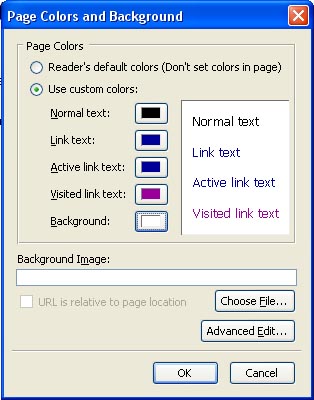
To set the text and background color for your current page, go to
Format, and then click Page
colors and Background.
A chart will come up that looks like this:
Click the dot next to Use Custom Colors, and then to change the colors,
click the box to the right of
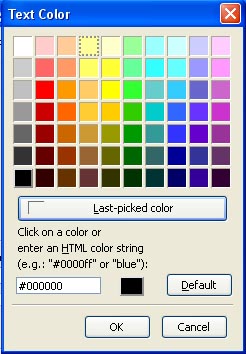
what you want to change, then a color chart will come up. Click
the color you want, then click OK.
When you have your colors selected, click OK on the window that is like
the above picture.
Another way to change the color of your text is to highlight your text
that you have typed, then go to
Format, Text Color, and the same color chart as before will come up,
looking like this:
Select the color you want your text to be, then click OK.
Remember to make sure your text is readable.
If you have to look at your text for a second before you can make it
out, then it isn't readable.
Size, Placement, Style

- When you highlight your text, then hit this button, it will make
your text smaller.
- When you highlight your text, then hit this button, it will make
your text larger.
- When you highlight your text, then hit this button, it will make
your text bold.
- When you highlight your text, then hit this button, it will make
your text italic.
- When you highlight your text, then hit this button, it will make
your text underlined.
- When you hit this button, everything on that line will indent to
the left on the page about 5 spaces.
- When you hit this button, everything on that line will indent to
the right of the page about 5 spaces.
- This button left aligns all of your text.
- This button center aligns all of your text.
- This button right aligns all of your text.
- This button justify aligns all of your text. Example:
Like the alignment of text in a book.
Try to not underline very much text, because when someone sees
underlined text, they think that it is a
link, and when you have too much of this, they won't know how to get
around your site, and will leave.