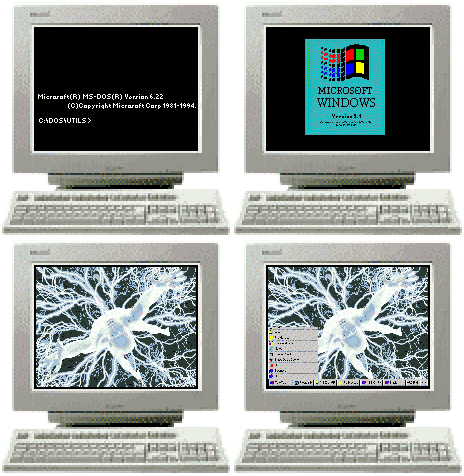
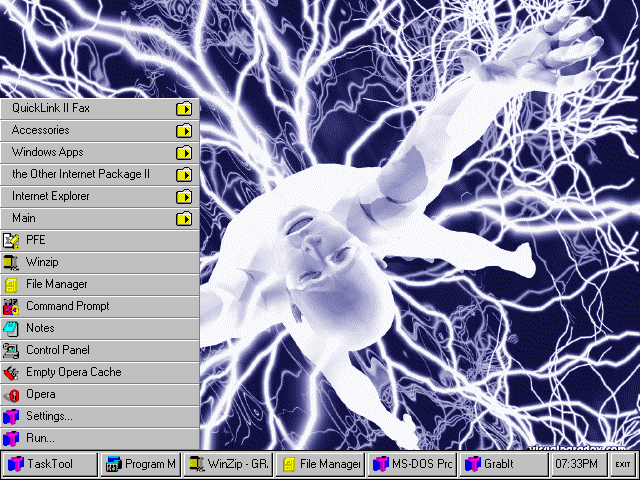
| 16 bit Windows Addons The animated GIF at the top of this webpage is showing you what a reboot of my Windows v3.11 system looks like. How did I get that desktop? I used Task Tool software and a graphic downloaded from Visual Paradox website. Visual is now functioning (2001-01-01) at a reduced capacity but continues to offer exceptional graphics. Screenshot of my desktop at 640x480x256 (91K GIF file). The above screenshot is of an 80386 33mhz W31 install with only 4 megabytes of memory using Opera v3.62 as the browser and a 234 megabyte hard drive! Tip: In Win3.x you can capture the entire desktop with the PrintScreen key or only the active Window with Alt + PrintScreen. Then you can paste the captured image into your MSpaint program from the clipboard. For even more changes to W31 desktop see the graphic below.
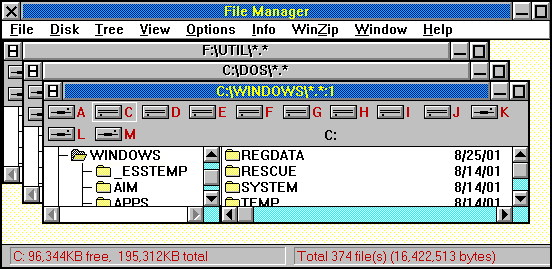
My new look for filemanager with style NEVESSA. MY CUSTOM DESKTOP using a ComPaq Deskpro 560 XE now with Pentium 60. Even though tasktool can completely replace the usual displays, the filemanager and others were beginning to look very drab in comparison to the rest of my desktop. I remembered an old URL describing a desktop makeover went there and downloaded the MAKEOVER.ZIP archive to install here. The good news is that it works and doesn't interfere with TASKTOOL and uses only 2% of my system resources. MAKEOVER is a set of utilities that will allow many different designs for your windows.
There are thumbnail screenshots of various desktop designs at the above URL. I chose NEVESSA as a starting point from the preset included configurations and then max'd out the 3D button option after using the button editor to edit the buttons with symbols similar to the ones used by W9x. Note the little `windows' graphic in the upper left corner of each window.
My choices are a bit different than the examples at the above URL. You can see that you will not be limited to just a few preset selections. There are other desktop makeover application links at the above URL (some broken links) and alternative toolbar applications that may suit your preferences and be even better than TaskTool for the way you use your system. Get the complete uninstaller mentioned below and give your new desktop a trial run. NOTE: The OSFRAME and some of the other MAKEOVER applications will modify your installed video driver if you choose to save your modifications. Create an archive with all files with the DRV extension and keep it where you won't lose it. You will need to use it if you want to go back to the original vanilla desktop. This is not mentioned in the documentation files. The good news is that because it does modify the video driver all of your displays, including third-party applications, will inherit your new "look". Other GUI customization options using Calmira and other utilities with screen shots of these changes can be viewed at PcFreak's website and others at this URL. After looking at the screenshots you will, no doubt, want more information about the Mask98 software customization of the W31 desktop to look like the W98 desktop. YOU ABSOLUTELY MUST HAVE THIS!! The Windows Complete Program Deleter must be run once before an install of new software and then once more when the install finishes. That's all you need do to have a way to uninstall those stubborn W31 programs. This is similar to having the WinME `GO BACK' function not just a text listing of changes. WCPD will remove the program files and any new directories the install added plus replace config.sys, autoexec.bat, win.ini, or system.in if they were modified during the install. This can be a fully automatic uninstall or you can step through each file and directory and WCPD will selectively uninstall them. I also save a copy of REG.DAT (WCPD does not save a copy of reg.dat) and most of C:\WINDOWS\SYSTEM in an archive using my RESCUE.BAT batch file just in case DLL's get overwritten with older versions during a sloppy install routine. Without WCPD I would hate to do a manual uninstall just to try out a new W31 application. Been there, done that, have the T-shirt. GET THIS! SCREENSAVERS This freeware screensaver displays your graphic files in sequence as a slideshow. Either fbreed or the more elaborate trinary will graph orbits of a three star cluster as a screensaver. For those who miss the snow falls of the northern climates there is virtual winter with a christmas tree and colored lights and adjustable snow fall. Must be outside in the yard? Not technically a Windows screensaver since it executes in DOS but Night Bird is just too nice to miss and there are others at this same webpage. NO SOUND CARD? Get the free Microsoft speaker driver for v3.x Windows via FTP.
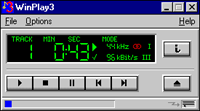
SOUND CARD but no drivers? Sound Blaster drivers MUSIC - I am using 16 bit WinPlay3 v2.3beta5 (807KB download) for W31 to play CDs of MP3 files created from MIDI music files. The MIDI to WAV conversion here uses WinGroove, then BladeEncode to create the MP3 files. On the W9x machine I use TIMIDITY or RipTide and LAME to create the MP3 files. All of my WAV fles are `normalized' to the same volume and edited using W9x GoldWave. No W31 WAV editors can load a 30-70 meg WAV file, unfortunately. NEW! Samples of my arrangements of MIDI recorded as CD audio at 44khz then converted to music files using Real Audio, Windows Multi-Media Audio, and MP3 at 128kbps are now available. Am working on a separate webpage just for sound applications and music files. I have collected quite a few MIDI and MOD players and music files for both. I can say that for 16 bit DOS nothing beats GLX as a MOD player and MOD4WIN is quite good for W31. I tend to favor either VanBasco's MIDI Player or the WinGroove player for W31 midi music. I haven't found a good 16 bit DOS MIDI player - yet - but I will. (see also MIDI from the main page sidebar menu) VIDEO for 16 bit W31 I haven't tried it yet myself. I don't know what the minimum processor speed is for this to work but one Windows expert has told me a 60mhz 486 should work. If your hardware is at that level or above you might want to give these a try.
Microsoft MultiMedia Video for W31
Netscape Audio & Video Plugins
More Netscape Plugins
Indeo Video 16 bit version. - Video for Windows 1.1e runtime (multimedia player) + Indeo Video Interactive codec R4.1 (AVI, Qick Time, etc. drivers), 16bit model. 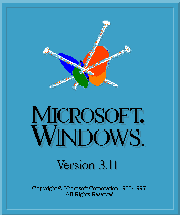 |
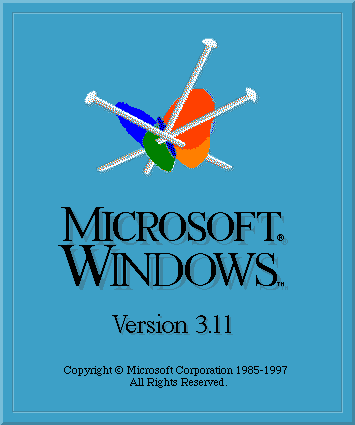
NEW LOGO for your updated Windows v3.11 (after installing the Microsoft updates to v3.1). This is also known as the Microsoft `splash screen' that displays while W31 is loading into memory. I have updated the version number to v3.11 and the revision date to 1997 (date of the patch update file) and put the graphic of the Microsoft MSN butterfly pinned to the top for a little color and humor? The included batch file does NOT modify your original files and includes the information you will need if you want to create your own splash screens.
|