
Changing Personal System Info
There a way to personalize the infos told by the right click and Properties on My Computer icon on the desktop...
As standard when you do that you will see the standard infos , such as :
Pentium XXX
XXX MHz
XXX MB of Ram
well you can change the background info (not the processors or the Ram , they must be real ).
It is pretty simple ...
Start with building an .ini file (do a new .txt and rename it)
Write this on the file :
[general]
Manufacturer= "HERE ADD WHAT YOU LIKE"
Model=Model: "HERE ADD WHAT YOU LIKE"
[Support Information]
Line1=""HERE ADD WHAT YOU LIKE""
Line2=""HERE ADD WHAT YOU LIKE""
Line3=""HERE ADD WHAT YOU LIKE""
Then save the file as oeminfo.ini
I use my name as
manufacturer...
You must put the file into:
Windows\System
for win98 and ME
Windows\Systen32 for Win2000, NT, XP
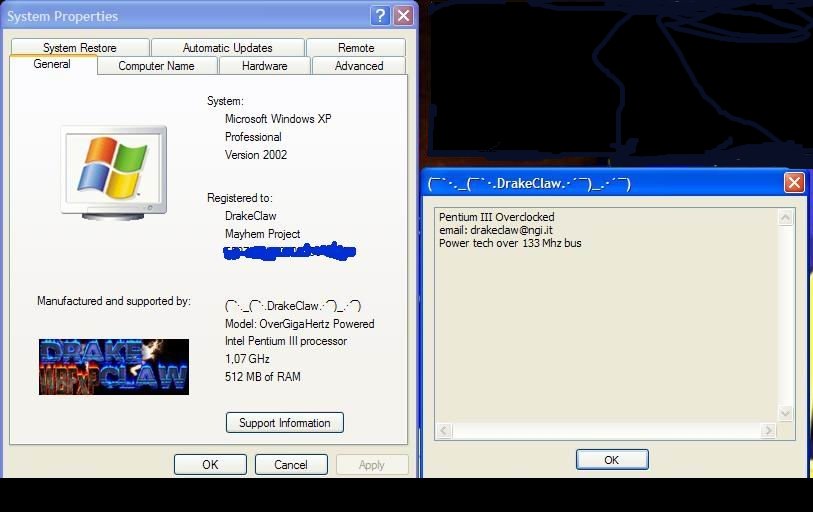
The Support information will be not showed, but there is a little ney button, click on it ...a new little Window appear showing the 3 lines
I add , my email , my Hackers manifesto ..
Now if you like
you can add a little image too...
Make a .bmp image (do some test for the size....
Name it as oemlogo.bmp ..put it in the same folder as oeminfo.ini and check
again ...
Near the Computer Infos , you will be able to see your Picture (remember ...a
little one is better..)
This is my result :
WRITTEN BY DRAKECLAW
