|
With the new Wally 1.53 beta, converting
images to WAD can never be easier.
Download Wally 1.53 beta.
-
Here
After you've got the program, start up the program and click
Wizard on the menubar and then select
HL Color Decal.
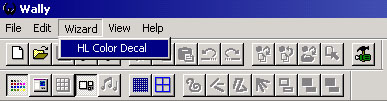
This will open the Half-Life Color Decal Wizard

Now press the File on hard drive to
select the BMP file or JPG file which you wanna make into spray.

Click OK and the conversion will take
place. The last color palette will automatically be edited to blue.

Now click menubar File and choose
Save As...
Save the pldecal.WAD into the folder of your HL
mod.
CounterStrike MOD - save it to \halflife\cstrike
CounterStrike Retail - save it to \sierra\counter-strike\cstrike
Team Fortress - save it to \halflife\TFC
Front Life Force - save it to \halflife\frontline
Half Life - save it to \halflife\valve
Overwrite the existing pldecal.WAD and click OK
Load up CounterStrike, but DO NOT go
into the player customization screen to see if it worked. If you go to the
player customization screen, your pldecal.WAD will be overwritten and you
will have to start over this thing again.
If you don't see your colorspray in the first spray, spray again, you will
definitely see your spray.
Have fun creating your very own colorpsprays!!
//
GaMbiT |

