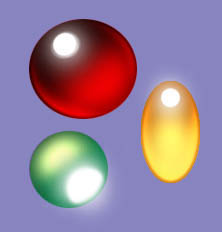
Jewels
This tutorial teaches how to create realistic jewels and crystals and such.
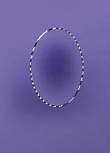
Step one is to mask off your shape. Darken the center using the airbrush or the burn tool, whichever you like.
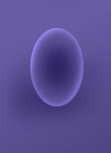 Now lighten the inside edges of the jewel with the dodge tool (set on
highlights) and deselect.
Now lighten the inside edges of the jewel with the dodge tool (set on
highlights) and deselect.
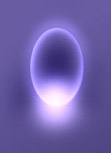 Now we just go wild with the dodge tool. Select a light color and give it a mild
glow around the edges and some glow at the bottom, then dodge the whole thing. I
just love my dodge tool.
Now we just go wild with the dodge tool. Select a light color and give it a mild
glow around the edges and some glow at the bottom, then dodge the whole thing. I
just love my dodge tool.
 Finally we add reflections. You can do a hard light reflection with the
paintbrush tool or a sort of frosted glass look like the one here using the
airbrush and a light purple or white.
Finally we add reflections. You can do a hard light reflection with the
paintbrush tool or a sort of frosted glass look like the one here using the
airbrush and a light purple or white.
Depending on where your light source is, the jewel can be done many ways. The light reflection is usually on the darkest part of the jewel and the light part is opposite the reflection.