

Welcome to my Linksys guide! This will discuss the complete configuration of a home network to accommodate a Linksys router for sharing internet access.
Introduction
This will introduce you to the 1 and 4 port routers.
1 Port Router
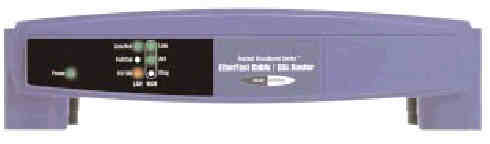
Usually for networks that already have hubs/switches in them. This device when added to such network adds internet sharing to it with an Ethernet compatible TCP/IP source such as DSL or cable.
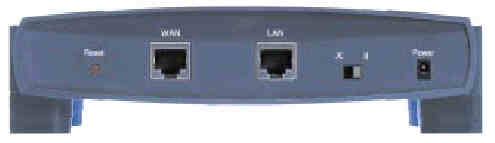
The WAN port is the port that connects to your broadband modem.
The LAN port connects to you existing hub/switch.
The X/II Switch toggles the LAN port between crossover and straight-through mode.
4 Port Router
Usually for people who have more than one PC but are not networked. This device will function as a 10/100 switch to serve your network and will add the capability to share your broadband access.
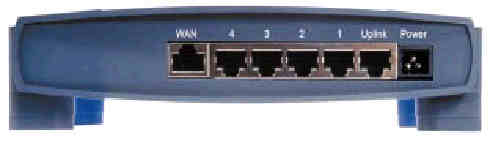
Just like its one port counterpart, the WAN port is used for your broadband modem and the numbered ports are used for your LAN. The uplink port is usually used to connect to a hub/switch.
Common Features
Both routers offer a reset button. On the one port model it is located on the back while on the four port model it is located on the front. The reset button, when pressed and released, will reset any possible jams in the router. When the button is held for a few seconds, the router will be cleared and the defaults will be restored. That procedure is only used in times where pressing and releasing the button fails to relieve routing problems.
Both routers also feature indicator lights. The power light indicated that the router is being powered. The Link/Act light on the LAN side show that there is a link established to a LAN device. This flashes when data is being transmitted over the LAN. The Full/Col light on the LAN side indicates that the port is running in full duplex mode. However, if the light flashes, that indicated that there is a network collision. The 100 light indicates that the port is running at 100Mbps. If not illuminated, the port is only running at 10Mbps. On the WAN side the Link light shows a successful link has been established with your broadband modem. The Act light indicates data is being transmitted/received. The Diag light only illuminates during the router's power-up. It indicates that the router is running its self-tests.

