
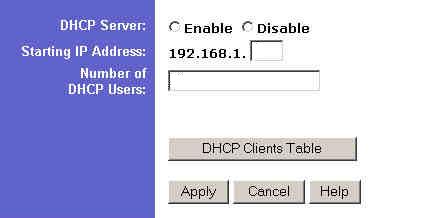
This page enables the internal DHCP server of the router. Only use this if you have computers that haven't been assigned a static IP in the computer setup.
If you do use DHCP then enter the Starting IP address that the DHCP server will use. This is typically the number after the last static IP used. For example if I have two computers and I give one a static IP it would be like this: Computer 1 will have the static IP of 192.168.1.2. If you set the router to start at 3 then it will assign 192.168.1.3 to the other computer if it is configured to get an IP address automatically.
The Number of DHCP Users box lets you limit the number of DHCP users. For example if I have three computers and one has a static IP and I set the number of DHCP users to one, then one computer will have no IP address and will have to be assigned a static IP or the Number of DHCP Users will have to be raised to accommodate the other computer.

 Previous Page
