
Welcome to the router setup!!
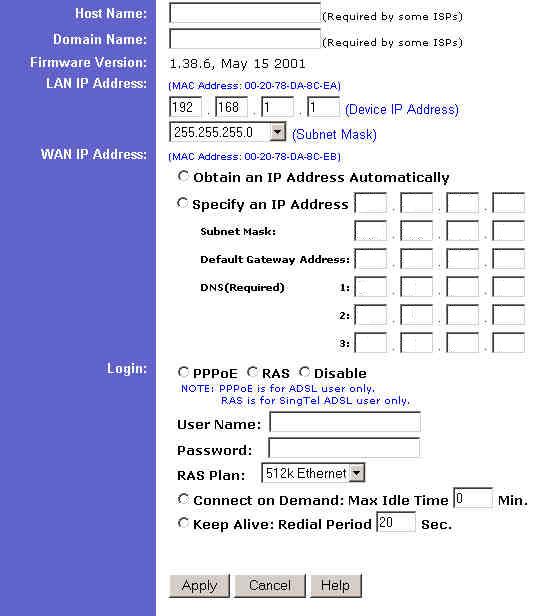
In the Host Name box enter the host name if required by your ISP
In the Domain Name box enter the domain name if required by your ISP
The firmware version is shown on this page. As I am writing this I am using the revised 1.38.6 beta firmware which can be downloaded from the DSLReports Linksys Forum.
The WAN IP address is the address your ISP gives you to identify you on their network.
Static IP
Select Specify an IP Address and in the boxes type the IP address given to you by your ISP. You should also have the Subnet Mask, Default Gateway Address, and DNS numbers available. If you do not know these numbers and you know you have a static IP contact them for these numbers.
You should select Disable under Login.
DHCP Client (Dynamic)
If your service uses a DHCP server to assign IP addresses to users select Obtain an IP Address Automatically and select Disable under Login.
PPPoE (Dynamic)
If your service uses PPPoE to authenticate users (normally users are given software to do this) then do the following:
Select Obtain an IP Address Automatically and under Login Select PPPoE. In the User Name box enter your given user name and in the Password box enter your password. Select Connect on Demand and set the Max Idle Time to 0 Min. You can also set the router to keep the connection active at all times. For this just select Keep Alive and enter a number 20 or higher for the Redial Period.
When done with all the configuration on this page just hit apply.

 Previous Page
