|
Pic No.1 TLi 1st stage
Pic No.2 TLi 2nd stage

Pic No.3 3rd stage TLi

Pic No.4 4th stage TLi

|
One thing I neglected to mention is that with NASSP 4 it is
now safe to launch with the autopilot on at 10x acceleration but not any
over! Now that your in orbit its time to decrease your *RInc so hit
Shift-R and then Shift-T = Moon, and follow its directions until your Rinc
is no more than 1.00, to Orbit Norm its + and to Orbit Anti-Norm its -.
After that is time to set up for a *TLi. (Trans Lunar Injection... as in
light your rocket motors to blast your... well to get to the Moon) As you
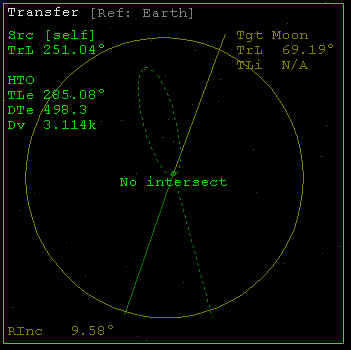
can see in picture No.1 you will need to hit Shift-X, Ctrl-T = Moon,
Ctrl-R = Earth, Ctrl-S = X. After doing that you wont see a thing in your
Transfer MFD so hit Ctrl-H and then Ctrl-+ until the little green dotted
oval intersects the solid orange circle as shown in Picture No.2. So make
the Green Dotted oval look like it does here (size wise it doesn't matter
where on the circle its at just size wise) after making the dotted green
oval appear as in picture No.2 you need to rotate the Ejection time (using
Ctrl-<>) until it looks like picture No.3. What you want to do to do
this is rotate the gray thing until it looks like No.2 but with the lowest
possible *DTe.
When you get to the point of Picture No.3 adjust the gray
bit until its just a very little bit ahead of the dotted orange line as in
Picture No.4. Now when it looks like Picture No.4 wait until the solid
green line is lined perfectly with the dotted green line and at that point
apply full thrust until the Solid green line is aligned perfectly with
where the dotted green oval was or is. (although the dotted oval should be
covered by your solid green one so in essence it shouldn't be visible) and
then Cut your thrust! your now on you way to the Moon. Stay tuned for part
two.
Please understand that many of the key paths are other that they are to
you, I apologize until I can fix this just ask the kind people in the
Official Orbiter forum.
|
|

