Hi! :o)
It would be great to see you at the Zone!
{Note: If you're having trouble signing on to the Zone or are not sure how to, please visit Zone Sign-in Procedure}
Getting Started
Download Instructions
Click the "Save" or "Save File" button. Save the file to a location you will remember, preferably your Desktop.
Windows Installation
Double-click on the patch to begin the installation process. Follow the onscreen directions from that point forward to install the patch.
For Scrabble Version 2 (red CD) visit Atari Support - Scrabble v2.0 (Red Box)
Download Instructions
Click the "Save" or "Save File" button. Save the file to a location you will remember, preferably your Desktop.
Installation The patch is a self-extracting EXE. Simply double-click or Run the file to begin the patch process. Follow the on-screen instructions.
Once the download is done, double click on the scrpatch or Scrabblev2_0Patchv1_2 icon.


For Version 1, you will get a window similar to this one.
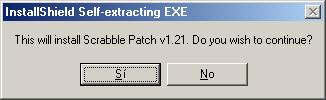
Click on OK
For Version 2, it will immediately start "unpacking" the information and go straight to the Install procedure.
Run the program... and you're all set!
NOTE: If you are having trouble getting these files, visit the Patches page to download the files from here :o)