Baibis' Scrabble® Cuate Site |
          |
||||||||||||||||||
 |
 |
 |
 |
 |
| There are a couple of ways to get your IP address:
Method 1For Windows 95/98/ME
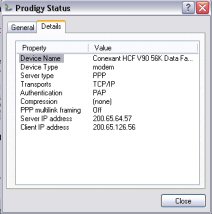
For Windows XP There are 2 ways to do this. First, you can right- click on the connection icon on your task bar. Click on Status
then click on the Details tab and you'll see your IP address
Or on your startup menu, go to control panel click on network connections click on the icon of your internet service click on the details tab
Method 2
|
||
| If you have any questions or suggestions, please | ||