
A Comparison of OS X, Linux, and Windows XP

Introduction
As Bob Dylan once said, "The times they are a'changin". Not that long ago users didn’t have a lot of choices. In fact for most there was no choice at all. Macs just didn’t have the software availability that windows had, and Linux only had a command line interface, which limited its use to computer "geeks". Now the similarities between these three operating systems are more noticeable than their differences.
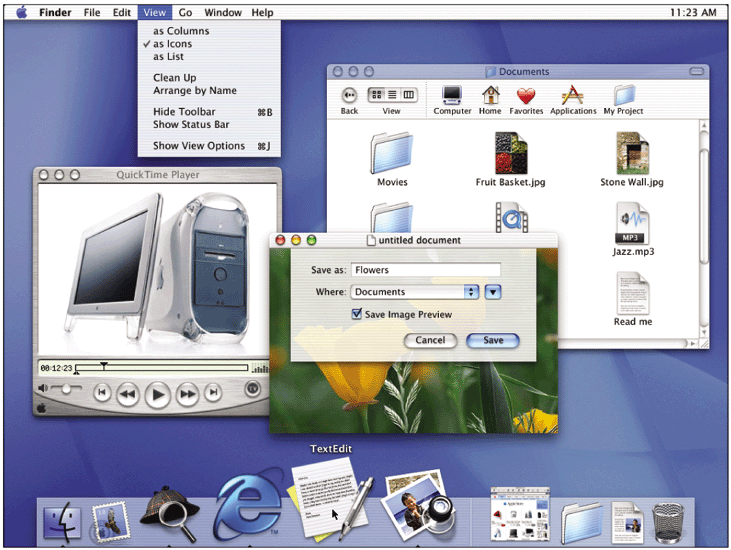
"Both Mac OS X and Windows XP can be considered mature operating systems, offering the robustness and stability long found with Unix. Many of the basic features are similar, in fact maybe more so in these releases than any others. With Mac OS X, Apple largely has focused on digital media--music, movies, photos and DVDs--bundling in very cool software, too."1 "Windows XP does digital media, too. Mac OS X may make using digital media easy, but XP unlocks more richness and features."1
"You might be pretty happy with Windows XP. But Windows continues to suffer from more than its share of drawbacks: From the newer operating system's incompatibility with older software to Microsoft's well-known security problems, Windows still engenders a fair amount of user aggravation. Windows XP also subjects its users to the indignity of the Microsoft Product Activation service: You might have to ask Microsoft for a new key if you upgrade more than one or two major components."2
Flexibility
"Linux, in one form or another, will run on everything from a 486 doorstop with 8MB of RAM (try that with Windows XP) to clusters of high-speed servers. It won't be the same version of Linux running the same applications, but Linux is good at fitting in where Microsoft leaves machines behind with Windows' ever-increasing minimum system requirements."2
"Most Linux distributions let you choose between multiple GUIs, including the two most popular, KDE (left) and Gnome (not shown). These share features familiar to Windows users, such as a "Start button" in one corner where you can launch programs, and a trash can icon on the desktop where you can find deleted files. On older hardware, you can run Linux without a GUI at all, or with one of several feature-light GUIs. Windows is a one-GUI-fits-all system: No Windows applications--even the command-line tools--will run outside of Windows' bulky GUI, making XP unusable on older, slower systems."2
"If you're not sure Linux is for you, you can install it along with Windows. If you decide you need Windows applications for which there are no Linux substitutes, you can simply switch from Linux to Windows with a reboot.
Dual booting may not be necessary in some cases. Most distributions come with software called Wine, which claims to run nearly 1100 Windows applications (with some tweaking of configuration files) under Linux. The downside: Thousands more Windows apps are still incompatible with Wine, and getting the compatible ones running presents a challenge even to tech-savvy users."2
"Virtual PC™ for Mac delivers true PC compatibility by enabling you to run multiple Windows operating systems directly on your Mac. Virtual PC provides you with the functionality and compatibility of a Pentium® PC through sophisticated software emulation of the standard Intel® chip set and other hardware components. It’s like putting a powerful PC inside your Mac. Using Virtual PC is as easy as installing any Macintosh application. You can run your Windows®, DOS or Linux software – including business, education, Internet and home applications – just like you would on a PC."3
Virtual PC for Mac is available with different operating systems pre-configured and pre-installed. Choose from:
Windows 98 2000 Professional XP Professional XP Home PC-DOS
$219 $249 $249 $219 $129
Software Availability
Contrary to my expectations, one look at Apple's game patches page at http://www.apple.com/games/updates/index.html#thirdparty reveals that there are plenty of games available for OS X.
" The world of Linux is filled with free software--some fantastic, some forgettable. Generally speaking, Linux has a reasonably good equivalent to every major Windows package. While a Windows user might edit images in Adobe Photoshop, Linux users turn to The GIMP. Microsoft's word processor, spreadsheet, and presentation applications from the Office suite are mimicked quite closely in OpenOffice and StarOffice on the Linux side. For the most part, the office suites in Linux are clean, professional-looking programs with support for many common Windows file formats."2
"If you can't find an application native to Linux that suits your needs, there's always Wine, which ships with almost every version of Linux. Wine can run many common Windows apps natively in Linux (for a list, see Code Weavers Wine Application Database). Getting Wine working sometimes takes effort, so CodeWeavers http://www.codeweavers.com sells its $55 CrossOver Office, which preconfigures Wine to run the popular Microsoft Office 97 and 2000 versions of Word, Excel, PowerPoint, and Outlook."2
Security
Since OS X, like Linux, is based on Unix, it is probably safe to substitute OS X for Linux in the following comparison.
"Creating user accounts is another key step that may seem new to Windows users. In Windows 9 x, user accounts are a trifling afterthought. In Linux (as in Windows XP/2000/NT), the operating system requires that a specific person be accountable for every action taken on the system. You'll end up with at least two accounts: the administrator account (called "root") and another you create for day-to-day use.
Only users logged in as root can install system software or change system settings. Linux lets you temporarily log in as the administrator to run specific tasks--a very nice timesaving convenience that helps maintain relatively high security. SuSE's YaST2 configuration and setup tool, for instance, routinely asks for the root password before it makes a change.
Windows XP Home, on the other hand, makes a security blunder in the name of convenience: All users get privileges equivalent to Linux's root account. On this point, Linux is clearly superior."2
Conclusions
"For many people, the similarities between Mac OS X and Windows XP may seem far greater than the differences. But without question, XP offers much more choice and a deeper richness of features--networking, file management and customization, among others. There is more software available to do more things. The available hardware supporting XP far exceeds that for OS X. For things that OS X does well, ease of use surpasses doing comparable tasks using Windows XP. The choice may come down to what you want to do with your computer. If that is largely limited to digital photos, music and movies and authoring or viewing DVDs, OS X is a clear winner. But many people may find they can do a lot more with their computers using Windows XP, particularly on the Web. So, if you're looking for fun computing that's a breeze right out of the box, maybe that new iMac with OS X is a good choice. But if you want to do more and don't mind a little more work, XP might be better."1
Of course both OS X and Windows XP are expensive and proprietary. Linux beats them both in that regard. It is not only free, but it runs on inexpensive "Wintel" hardware. It is also customizable in that you can choose which version (Red Hat, Mandrake, SuSE, etc.), which components of it you desire, and which user interface you like best. There is also a great deal of free or inexpensive software available for Linux. Although I suppose there is a fair amount of freeware and shareware for Windows as well, some of that was ported from the Unix world.
" But Linux still poses a number of challenges to new users. Linux drivers are hard to find for some hardware. Unfamiliar file systems, incomprehensible error messages, and the occasional need to compile applications from source code await Windows users who are considering a leap over the OS divide."2
