Tomken Dual Battery Tray for 76-86 Jeep CJ & 87-90 Jeep Wrangler YJ
Quadratec TMB-1034-T $104.99
Better Notes than what is included on how to install the Tomken Dual Battery Tray.
1984 Scrambler
Summary
This is a step by step install of Tomken Dual Battery Tray On a 1984 Scrambler. These are better notes than what is included with the kit. I skipped a lot of the old battery tray removal as it is fairly straightforward. Eventually included in these instructions is the install of a new higher power alternator. I got the connector necessary from an AutoZone but O’Reilly’s should have it as well. I will get the part number and add it later.
Let’s Begin
First you have to remove the old jack mount and the old battery tray. Save the screws as you can re-use some of them. One of the small screws from the jack mount is ideal for the connection to the fender. You should keep all four screws that were used to connect the old battery tray to the firewall.
In this picture, the yellow squares show the bolt/nut on the firewall that you will need to loosen/remove to remove the old battery tray supports. The bolt in the yellow square on the left only needs to be loosened enough to slip the support out. Re-tighten when the support is out.
The nut in the yellow square on the right must be completely removed to remove the other battery tray support. Plus, you must remove the bolt and nut in the red square and remove the fender support in order to remove that support. When finished removing that support, re-attach the fender support shown in the picture. Don’t forget.

In this picture, the red boxes highlight the holes on the firewall you will use to mount the new battery tray.

In this picture, the yellow box highlights the re-use of the screws on the firewall. The red box shows the small screw from the jack mount.

|
In this picture, the two yellow boxes towards the top highlight the re-use of the screws on the firewall. Use the same screws you removed from the firewall.
The red box shows one of the small screws from the jack mount.
The yellow box towards the bottom shows where the small screw and the last screw from the firewall will go.
|
|
|
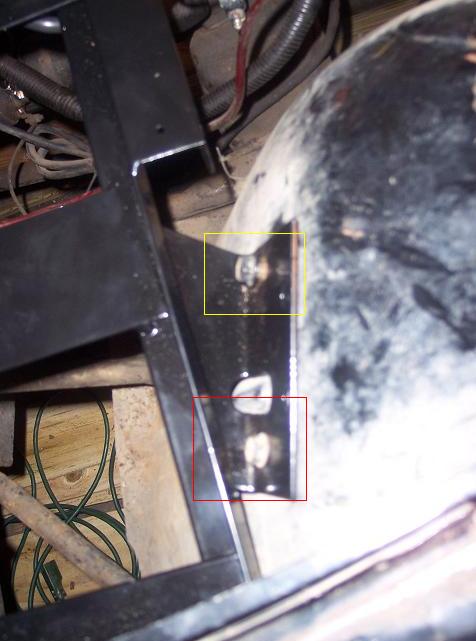
In this picture, the yellow box shows where the last screw from the firewall goes. The red box shows where the small screw from the jack mount goes.
Since the jack mount has some kind of permanent square-nut attached to the fender well, a nut is not necessary. If you did not have a jack mount on your Jeep, use the nuts & bolts included with the new battery tray kit.
|
|