
Two Ways to use a Tube
Download a sample Tube to use.
Download a PSP file to use.
When you are Tube'ing on the Internet you will see some tubes come with the psp file extention or are for PSP version 5 or 6 ...not to worry download them anyway. We have learned how to use a Tube using the"Tube Tool". The problem with the "Tube Tool" is it gives you NO freedom to move your Tube around on the graphic. Once you click on your graphic the Tube goes where it will stay. I have chosen a set of Tubes I have downloaded from the Internet to use with this Tutorial. Small problem they are all set to one Tube. Now this tutorial will help those who have said they want only 1 certain Tube (like the butterfly) in the PSP "Tube Tool" collection. If I were to EXPORT this tub file into my C:\Program Files\Jasc Sofware Inc.\Paint Shop Pro 7\Tube folder where the "Tube Tool" tube files are kept, when we used the "Tube Tool" we would get all theAngels from this tube on our graphic. So first let me show you a simple way to take only one Angel from this Tube, then I will explain the 2nd way to use a tube.


If you went to the JASC Website Tutorials for making Tubes forget the grids and hocas pocas you saw on the website. All you need to do is choose your "Crop Tool" holding down the left mouse button draw a retangle around the Angel you want.
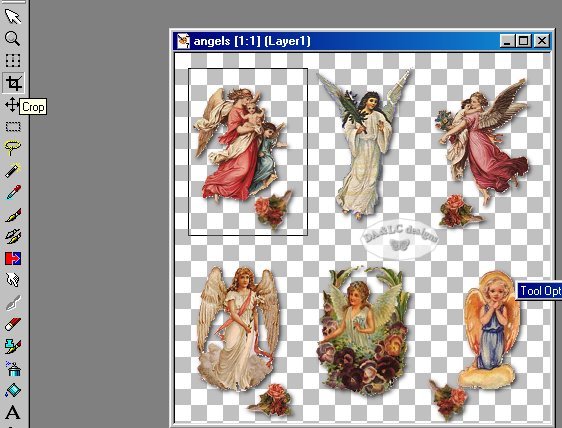
Go To IMAGE>CROP and you will have only that 1 Angel. Change her name to what you want and EXPORT>PICTURE TUBE and you have your single angel. If we downloaded and are using a PSP extention tube do the same process. Because of the second way we can use tubes, both psp and tub extentions are both called and given to you as tubes by some Webmasters.
Or you can use you Tube this way!
With the second way to use a Tube we can use her without saving her if we think we are only going to use that Angel 1 time. That way our "Tube Tool" folder is not huge with Tubes we only intend to use once. If you do not want your Tube to be used with the "Tube Tool" but would like to keep it anyway save it to another Folder of your choosing. This process can be done with any PSP Program Version Tube and it can be done with a psp extention File. Create a new image~ FILE>NEW ~ 300 wide 300 hight, any color. Make active your Tube or PSP graphic...EDIT>COPY now make active your new image EDIT>PASTE AS NEW LAYER.

Notice
when you put your mouse cursor over your graphic you see the "MOVER TOOL"  icon. This means we
now have the freedom to move our Tub like we do not when
using the "Tube Tool". Another thing we can do with our Tube that we
can't do when using the "Tube Tool" is IMAGE>3D>DROP SHADOW.
icon. This means we
now have the freedom to move our Tub like we do not when
using the "Tube Tool". Another thing we can do with our Tube that we
can't do when using the "Tube Tool" is IMAGE>3D>DROP SHADOW.

Happy Tube'ing!
All Tutorials and Graphics on this site ©byDiana/Laura 2000 do not use without permission.
