
What are Plug-ins
For our next 2 Tutorials we will need to use plug-in's. Plug-in's are filters that can be used with PSP (Taken from PSP HELP: "You can use external image processing filters with Paint Shop Pro by selecting the options on the Plug-in Filters preferences tab. “Adobe-compatible” is the Windows standard for image processing filters"). Plug-ins change the graphics in unique and sometimes in one preset way. PSP comes with its own set of Plug-ins. PSP does not have many and sometimes they can be a lesser quality than what we can get on the Internet.
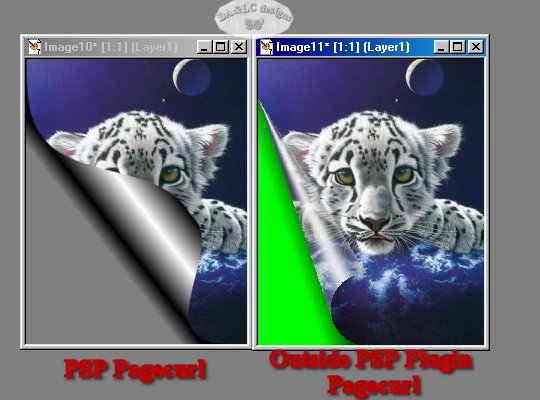
Notice on the PSP (Paint Shop Pro Program Plug-in) Pagecurl the gray background and the gray underside of the Pagecurl...On the Pagecurl Plug-in I acquired off the Internet my background shows...and the underside of the curl appears transparent..which would you want if you were making an animated card? Number 1 if you had writing or a graphic on your background you would never see it with PSP's plugin when the curl is applied. It looks more like a tin can opening and the range we can curl is much less with PSP's Plug-in.
In Animation shop we can create a Page Curl effect but again it will not handle Layers so we can not choose to use our own bottom layer.. and I seem to only be able to make the Page Curl Effect go one way, so it scrolls open but does not scroll up again like our downloaded outside plug-in does.


EXAMPLE of other Plug-ins
For this example we are using Filters Unlimited Plug-in that works with PSP, the first picture I added a border and using the Magic Wand tool I selected it and the plug-in filled the border with noise, the second I added a another border and using the Magic Wand tool I selected it and the Plug-in distorted the main graphic and added it to the selected border. It's a start of a very unique picture frame.
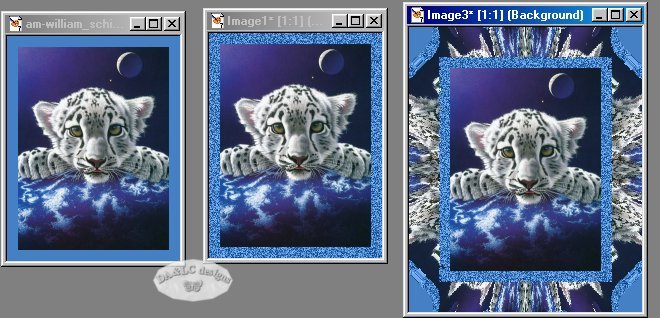
or we have with another Plug-in filter we can turn our Graphic into a Jigsaw Puzzle

Many PSP ADDICTS make Plug-in's and give them away free while some are made by companies. Always watch your Tube and Tutorial sites for links to plug-ins. Everyone hears about EyeCandy (probably the best known plug-in) but its NOT the only or probably even the BEST plug-in if it does not do the effect you want to do.
Example of Eye Candy 4000 Corona Filter ~ my most used filter from Eye Candy. It adds an aura in the color & size you choose around the image.
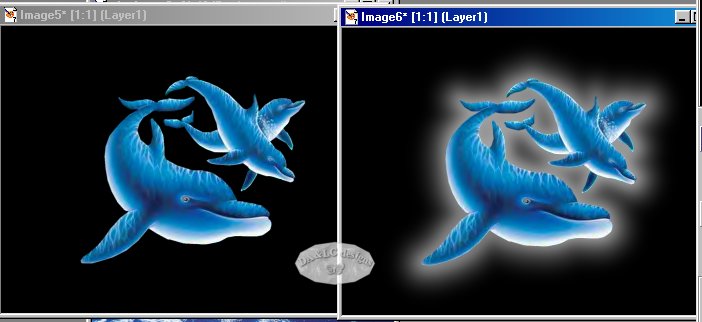
For the next example I used both Filters Unlimited and Eyecandy 4000, yes we can use any number of Plug-ins on one graphic.

Could we do the same thing in PSP with out the Plug-in? Yes but it would take a LONG time and can at times be a big process. First for the font we would add noise then we would Hot Wax and then Colorize then maybe HOT WAX and COLORIZE again and again. It could take minutes to an hour or more to get the exact color and effect you want. But with a plug-in the process could take seconds. As for the EyeCandy Carona I would have NO clue how to duplicate that effect in PSP..
Before we go on....Why use Paint Shop Pro and why not Adobe?
You will notice when downloading and looking for Plug-ins they can be used for lots of other graphic programs. So why do we want to use them in Paint Shop Pro... I own Adobe Photoshop & Illustrator, Ulead Photoimpact, Kai's and a few others not so well known. Paint Shop Pro's price is VERY affordable as compared to the others. Don't let the price fool you though..its a fantastic valid program..it's just not a designer set of jeans so to speak. Because of the price being affordable and the versatility of the program people like us can buy it and play with it. Take Adobe Illustrator, if you want to learn it what do you do? You pay big money and go to school. What if your only taught the very basics or your teacher does not know the program fully? You lose. (There are a FEW groups out there for Photoshop but not many, however many books are written for Photoshop). Paint Shop Pro has a cult following, we call ourselves PSP ADDICTS. Each of us finds ourselves falling into a niche..Diana's niche is making graphics for Webpages and/or teaching & writing Tutorials... Laura's is teaching. Some only want to make Tags or Tubes. Some only want to make Plug-ins or Masks for others to use. While others create animation's for every Holiday or happening. Some love fonts and create full graphic font sets. Some want to run groups with games and tutorials for PSP. The thing is what do you do when you want to learn PSP..you go out on the Internet and get all the help you want and millions of tutorials and tools (with the exception of a few) because they are all free. For the most part the only investment you have to make is time and under $100.00 for the Program and the price of getting out on the Internet. With PSP you can learn not only how to use the program normally as would be taught in most classes but you can learn from the INTERNET many of the special effects and graphic manipulations that is only (besides our class) taught on the Internet. If you ever took a Photoshop or Illustrator class...did you learn about Plug-ins and how to actually use them to create beautiful artwork?
We can not share the Plug-ins we are using with our class projects. You will need to search for the Plug-Ins and the DLL files to use them on your own..
Because the Plug-in's we are using are copywritten we can not share them. I would start my search by putting PLUG-IN's into your search engine and going from there. With the Plig-ins you should get an explanation of how to install and what files you need to put in your WINDOWS SYSTEM & WINDOWS DIRECTORY to make them work. The tutorials were added to the class to make you aware of outside Plug-ins and their functions.
All Tutorials and Graphics on this site ©byDiana/Laura 2000 do not use without permission.
