
Outlook Express
Download Midi file
Many Servers use Outlook or Outlook Express as their email programs. The only version I have is Outlook Express Version 6 to use as an example. With Outlook Express we can not only add Stationary, Graphics and Animations but we can add Music to our emails. Again...The last I knew AOL people could NOT get your emails in the way you intend to send them..they come into AOL as an "Attachment". When sending Music limit your sends to MIDI FILES because of file size. I will show you how to add a Music file... BackgroundGrapic add's will be the same. On the Internet there are MANY sites to find and download Stationary Sets for Outlook, or try making one of your own.
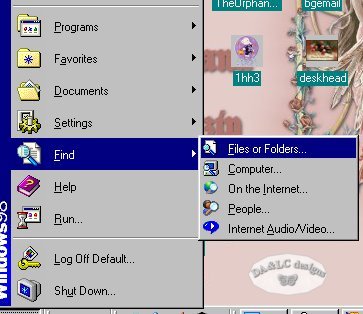
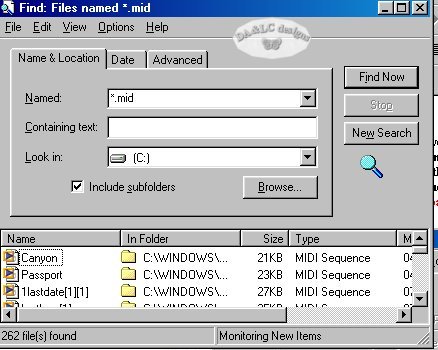
*hint: Heres something 99.9% of people do not know, even some of the best Webmasters. When you view a website with music that music will reamain on your Computer in your Temp folder until you remove it. How do you get it? Go to your START Button and FIND>FILES or FOLDERS..put in *.mid Star means "all" and .mid is the extention. Once your Midi files comes up in FIND drag and drop them to a Folder of your choice. This will save you long downloads when hunting for music.
Tutorial for Outlook Express
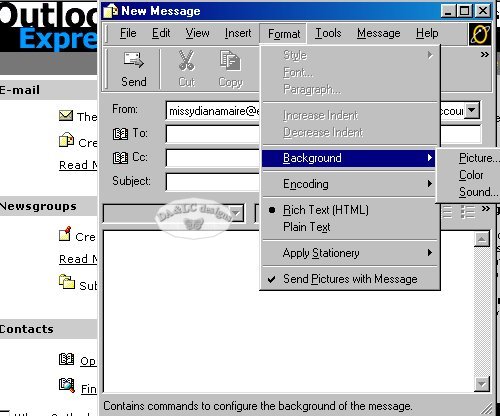
Go to Format>Background and left click on Sound
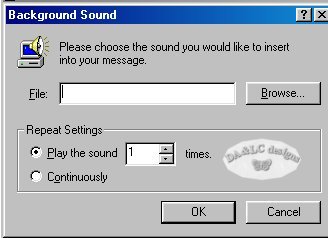
Browse to where you keep your MIDI files.
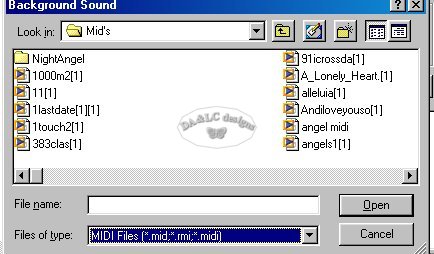
Using your Down Arrow in "Files of type" scroll to MIDI FILES.
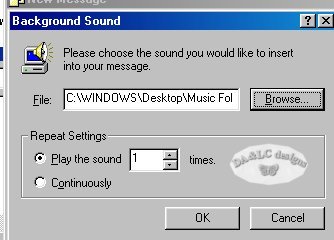
Click 1 time on the Midi file you want and press OK. You can choose to play the song only a chosen amout of times or contiuosly.
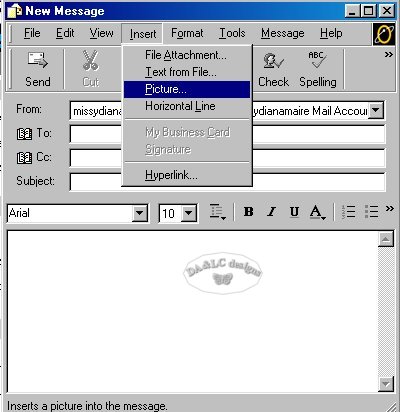
To add a picture you go to INSERT PICTURE and follow the same general Tutorial.
All Tutorials and Graphics on this site ©byDiana/Laura 2000 do not use without permission.
