
Terminology
Students are provided a list of terms on the school
network and will complete the terms as homework assignments
IPO Concept
Electrical signals are sent from input devices which are concerted by the processor into information that computer can understand. This information is then directed to the appropriate output device, which displays the information in the proper format.
Input Devices: The pieces of hardware that allow data to be inputted to a computer.
(I.e.) Keyboards
CPU: The hardware that performs the calculations on the data that is inputted.
(I.e.) Processor
Output Devices: Hardware that outputs the processed data in a form that is understandable.
Input
/Process /Output Keyboard
/Processor /Printer Hardware:
Monitor
Concepts: Monitor-
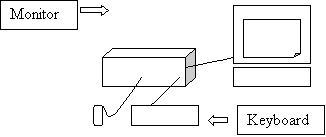
A monitor is considered an output device that displays information to a users
visual sense. Resolution
– A computer screen is made up of objects called dot pixels that are placed
across a screen. The more dot
pixels that are placed on a screen the better the picture resolution.
The number of horizontal and vertical dot pixels defines picture
resolution. A normal monitor
resolution is 640 pixels horizontal and 480 pixels vertical. Interlaced
– One major complaint by computer user is that looking at the screen cause
headaches. This is the result of
how monitors actually display graphics. When
an image appears on a screen it is broken down into a serious of lines called
scan lines. The problem with
interlaced monitors is that after every scan line is a blank line, which gives a
wave effect to the viewer. To over
come this problem you need to switch to a non-interlaced monitor.
Non-interlaced monitors do not have blank lives between each scan line
and as a result the wave effect is lost. Dot Pitch
– the distance between each dot pixel is referred to as dot pitch.
The smaller the dot pitch the better the picture quality.
On a typical monitor you would have a dot pitch of .28 where a bad
monitor would have .31. As one
would increase picture resolution the picture quality would get worst. Keyboard
concepts: Keyboard:
Is an input device that allows you to enter data through typing.
Key lock – Many computers
have a lock on the back of the computer that looks like a pad lock.
This lock is used for disabling the keyboard Caps Lock –
When entering data changes all letters inputted to the capital letter. Shift –
When pressing the shift button, several keys on your computer will perform a
different function than usual. Mouse
concepts: Mouse:
Is an input device that allows a user to select icons and programs that
appear on the screen. Drivers
– For a mouse to work it must have software program telling the application
program how to use the mouse. This
is true of several types of hardware. Floppy
Concepts: Should be used as a backup or as a way
of transferring files. Floppy Disk
– A magnetic storage device that allows for the saving of information outside
of the computer. It is used for
temporary storage and is much slower than a hard drive. Hard
Drive concepts: Hard Disk Drive:
Is the major memory component of a computer.
It is fast, reliable and has a large capacity. Fragmentation-
During normal hard drive disk usage there is a high incidence of creating and
deleting files. When files are
created they are saved continuously one after another.
When a file is delete it creates an empty space in the memory.
This space can then be used to save a file.
A problem associated with this type of saving is if the new file is
bigger than the memory space left by the deleted file.
What occurs is the file is saved in separate chunks with part of the file
saved in the empty file space and part of the file being saved at the end of the
continuous file stream.
S1 Processor-Basically
the brain of the computer where all calculations are completed. Random Access Memory:
This is the memory unit of your computer where software programs are actually
executed. Ram Concepts:
All software programs are loaded on the hard drive of a computer.
When a user selects a program the computer goes to the hard drive and
makes a copy of the selected program. The
computer then takes this copy and loads the software program onto the ram where
it is executed. Read only Memory:
Has the start up commands for the computer. ROM Concepts:
Computer commands are hard wired which means they cannot be changed. Motherboard:
The main circuit board of the computer where all hardware is connected so
data can be directed properly. Power Supply:
Supplies power to the computer to run its internal functions even if the
computer is unplugged.
Printer

 (I.e.)
Monitor, speakers)
(I.e.)
Monitor, speakers)
Memory Concepts
Other Important Hardware
