
In thinking about the last episode of XENA, you were thinking about something intangible. You can’t grab it and throw it against a wall, or break it in half, or weigh it on a scale. It does not have a physical existence.
In contrast, the TV set you watched XENA on is tangible. It does have a physical existence. You can grab a TV set and throw it against a wall, and you can break it in half. You can weight it on a scale.
TV sets are useful because of the combination of the tangible (the set itself) and the intangible (the programs that it displays.) Computer systems are useful in much the same way---they are a combination of tangible components called hardware and intangible components called software.
The hardware components of a computer system are the tangible, physical parts made up of electronic and mechanical parts.
The software components of a computer system are the intangible parts: the data and the computer programs. Software can be stored on physical parts such as floppy disks just as a XENA episode could be recorded onto a VCR tape. But the computer program is an intangible collection of ideas, not the physical storage device.
The major hardware components of a computer system are:
You probably have a personal computer in front of you. The processor, main memory, and secondary memory devices are usually contained in the systems unit. This is the rectangular box that is sometimes called “the computer.” The monitor (the TV-like screen) is an example of an output device. The arrows in the figure show the flow of data.
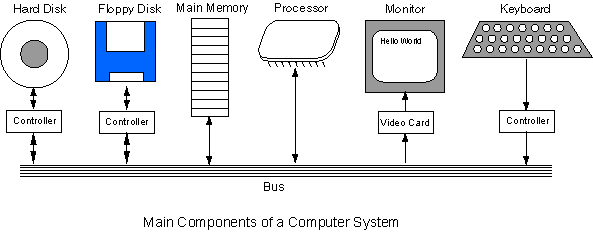
The bus is a group of wires on the main circuit board of the computer. It is a pathway for data flowing between components. Most devices are connected to the bus through a controller, which coordinates the activities of the device, and the bus.
The processor is an electronic device called an integrated circuit. Usually it is about a one inch square of black plastic, with many small electrical connectors sticking out. Inside the square of plastic is a smaller square of silicon containing millions of extremely tiny electrical parts. A modern processor can contain as many as 100 million transistors. The processor is the “brain” of the computer system. It does the fundamental computing within the system, and directly or indirectly controls all the other components.
The processor is sometimes called the Central Processing Unit or CPU. A particular computer will have a particular type of processor, such as a Pentium or a SPARC chip. (Integrated circuits are often called “chips.”)
The processor is the brain of the computer. All fundamental computing takes place in the processor. Other components contribute to the computation (by doing such things as moving data in and out of the processor), but the processor is where the fundamental action takes place.
Unlike the human brain, which combines memory with processing power, a computer processor has very little memory. It must rely on other components to hold data and programs and to save results. The memory in a computer system is of two fundamental types:
Main memory is where programs and data are kept when the processor is actively using them. Main memory is intimately connected to the processor, so moving instructions from the program and data into and out of processor is very fast. Main memory is sometimes called RAM. RAM stands for “Random Access Memory” which means that the memory cells can be accessed in any order.
When people say that a computer has “32 megabytes of RAM” they are talking about how big its main memory is. (There will be more about bytes and megabytes later on in these notes.) Nothing permanent is kept in main memory. Sometimes things are placed in main memory for just a few seconds; only as long as they are needed.
Secondary memory is where programs and data are kept on a long-term basis. Common secondary storage devices are the hard disk and floppy disks.
A hard disk might have a storage capacity of 8 gigabytes. This is about 250 times the amount of storage in main memory (assuming 32 megabytes of main memory.) However, a hard disk is very slow compared to main memory. The reason for having two types of storage is this contrast:
Floppy disks are mostly used for transferring software between computer systems, and for casual backup of software. They have low capacity, and are very, very slow compared to other storage devices.
Input and output devices allow the computer system to interact with the outside world by moving data into and out of the system. An input device is used to bring data into the system. Some input devices are:
An output device is used to send data out of the system. Some output devices are:
Input/output devices are usually called I/O devices. They are directly connected to an electronic module inside the systems unit called a device controller. For example, the speakers of a multimedia computer system are directly connected to a device controller called an audio card (such as a SoundBlaster), which in turn is connected to the rest of the system.
Sometimes secondary memory devices like the hard disk are called I/O devices (because they move data in and out of main memory.) What counts as an I/O device depends on how detailed you are looking at a computer system. In a general overview, secondary storage plays a different role than the I/O devices listed above.
Computers that constantly run a control program, such as the computer in your car, are called embedded systems. Usually they run just one program that is permanently kept in a special kind of main memory called ROM (for Read Only Memory.)
Software is the programs and data that a computer uses. Software is kept on some hardware device such as a hard disk or floppy disk, but it itself is intangible. Say that you have a floppy disk with a program saved on it. Now say that you erase the program from the disk. The atoms and molecules of the disk are the same ones as before, but now the program is “gone.” The intangible software has been removed without removing anything tangible.
Software consists of both programs and data. Programs are lists of instructions for the processor. Data can be any information that a program needs: character data, numerical data, image data, audio data, and countless other types. The distinction between programs and data is not as clear-cut as you might think, however.
Both programs and data are saved in computer memory in the same way. The electronics of computer memory (both main memory and secondary memory) make no distinction between programs and data.
The realization that both programs and data can be saved using the same electronic methods is one of the most important ideas in computer science. Computer systems can use their memory for whatever needs arise.
There are two categories of programs:
Application programs (usually called just “applications”) are programs that people use to get their work done. Computers mostly exist because people want to run these programs.
Systems programs are needed to keep all the hardware and software systems running together smoothly. The most important systems program is the operating system. In most modern computers, the operating system is always present when the computer is running. It coordinates the operation of all the hardware and software components of the computer system. The operating system is responsible for starting application programs running and finding the resources that they need. When an application program is running, the operating system manages the details of the hardware for it. For example, when you type characters on the keyboard, the operating system determines which application program they are intended for and does the work of getting them there.
Modern operating systems usually come with a user interface that enables users to easily interact with application programs (and with the operating system itself) by using windows, buttons, menus, icons, the mouse, and the keyboard. Examples of operating systems are Unix, Windows 98, Windows NT, Linux, Solaris, and System 7.
If you are running Windows NT or Windows 98 do the following:
The above procedure might not work, depending on how your computer has been set up. If it did work, you will have seen that there is quite a bit more going on in your computer than the one or two applications that may be running.
The operating system is a complex collection of many programs concerned with keeping the hardware and software components of a computer system coordinated and functioning. It is like a shop keeper who keeps a shop in order by attending to customers, handling supplier deliveries, stocking the shelves, doing the bookkeeping, and so on.
The operating system is software; the same hardware can be used with many different operating systems (although only one at a time.) Sometimes the operating system on a computer becomes corrupted (perhaps because of a computer virus) and must be tediously re-installed. Until it is up and running again, other programs will not be available
When a computer is started up, the hardware will automatically load the operating system and start it running. This process is called booting. The reason for this odd term is that the operating system is itself involved in getting itself running---a process that is like someone “pulling themselves up by their bootstraps.” Once the operating system is running, it is used to start up any other program.
Here is a (simplified) list of what happens when the user (you) starts up an application. Assume that the operating system (OS) is already running.
As the application runs, the OS is there in the background managing resources, doing input and output for the application, and keeping everything else running.
A computer network is when two or more computers are connected so that they can exchange data and programs. When a computer is a member of a network, the programs it runs and the data it uses can be on the hard disk of some other computer on the network. In business and industrial settings, most computers are on a network. The operating system that runs on a networked computer must manage its share of the network (along with managing all its other responsibilities.) The operating system is able to find programs and data that are stored on other network computers, and copy them into its own main memory.
In a local-area network only a few dozen computers are connected together, usually all located within the same building. Each computer has a network address that the other computers use to access it. Usually the computers share a printer. There may be an especially powerful computer called a server who’s hard disk holds all the application programs and data that the other computers are expected to need.
Each computer in a network has a network interface card in its systems unit. This is an input/output device that sends and receives data over cables. The network interface cards of computers on a network are connected together with cables.
Large organizations need to connect many more computers than can be handled with a local area network. A wide-area network can connect thousands of computers together over great distances. The long distance connections are made by using fiber optic lines, telephone lines, microwave communications, and satellite communications. Each computer in the network has a network address (as with local-area networks) to uniquely identify it.
Wide-area networks use a variety of special hardware to manage the flow of data. When two computers share data, this hardware makes it appear that the two computers are connected together directly. In reality, there may be dozens of network devices between the two computers.
All these devices use the same method for dealing with data. Without a common method of dealing with data, a large network would become a hopeless muddle. An agreement about how to represent and transmit data over a network is called a protocol. Usually large networks use a protocol called TCP/IP (for transmission control protocol/internet protocol.)
The Internet consists of many wide-area networks that have been connected together to form one huge world-wide network. Even on this huge network, each computer must have a unique network address, much like each telephone in the world has a unique telephone number (if you include the country code and area code.)
