Cubical. mmmm cubes.. |Photoshop|
Cubical Space
Wanna make a nice cubical text effect? Lets go then!
- First open a new document, or the document you want your text on. Make it around 250x75 pixels.
- Write some text. I used Arial Black, color: black
- Now duplicate this layer (layer > duplicate) and on the bottem one go Filter > blur > gaussian blur. Set it to 2.0
- Filter > Pixelate > Mosaic. Set it to 10.0. it depends on the size and font, so fiddle around with it.
- Filter > Sharpen > Sharpen. Then press ctrl+F twice. That re-sharpens it, since sharpen was your last filter used. Hope you like it..
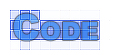
The only difference in the picture above from your own result is that i started with a different color, put a stroke on the top layer and changed its transparency.

