| <<< Back
System board Expansion Slots From NP Technology In a system board you can see different type of slots to install expansion cards (e.g. sound card, modem, etc...). ISA (Industry Standard Architecture) (8-bit & 16-bit) see pic This type of slot is the oldest still in use today. If you open up an old 286, you'll see a few of these. An 8-bit ISA slot is capable of 0.625MB/sec transfer rate between the card and the motherboard. Later versions of this slot were 16-bit, capable of 2MB/sec. This is still slow compared to today's standards, but cards such as modems do not require anything faster than this. If you look at your motherboard's slots, the longer black ones are the ISAs. If they are all one size, they are all ISAs. Modern boards are no boasting any more than maybe two of these bad-boys, only because people only use them for their modems or older cards that haven't yet replaced. EISA (Enhanced Industry Standard Architecture) see pic This type of slot is not used very often in desktop machines. It is used mainly in servers, or computers that host networks. With such a computer, the demands placed on its components are too big for ISA to handle. Also, the EISA bus is capable of bus mastering, which allows components attached to the bus to talk to each other without bothering the CPU. This feature is much like SCSI and speeds up the computer quite well. MCA (Micro Channel Architecture) see pic Not too common either, this bus was created by IBM. It is 32-bit, like EISA, but you can't stick ISA cards into it. MCA was capable of bus mastering, plus it could look at other devices plugged into it and identify them, leading to automatic configuration. MCA also produced less electrical interference, reducing errors. VESA (Video Electronics Standard Association) see pic This is a very fast interface made up mainly for fast new video cards. All of those fancy videos and graphics require much speed. The VESA-Local Bus, or VL-Bus, is connected straight to the CPU's own internal bus, hence the name "local". This bus can transfer data at 132MB/sec. VESA buses are basically an ISA slot with an extra slot on the end. The whole thing is about 4 inches longer than an ISA slot. Again, you don't see these much anymore. PCI (Peripheral Component Interconnect) see pic This is the other very fast bus developed by Intel. It is different than the VL-Bus except that it runs at the same speed. There is a fast interface unit between the card and the CPU that does the talking. This unit made the bus independent of the CPU, a drawback on the VL-Bus, which was limited to the 486. Also, you can plug cards into it without any configuring. The bus is self-configuring, leading to the plug-n-play concept in which each add-on card contains information about itself that the processor can use to automatically configure the card. This slot is most popular with Pentium and later machines, although occasionally you will see one on a 486. PCMCIA (Personal Computer Memory Card International Association) see pic This is a special socket in which you can plug removable credit-card size devices. These circuit cards can contain extra memory, hard drives, modems, network adapters, sound cards, etc. Mostly, PCMCIA cards are used for laptops, but many PC vendors have added PCMCIA sockets to their desktop machines. The socket uses a 68 pin interface to connect to the motherboard or to the system's expansion bus. There are three types of PC cards: Type 1 slots are 3.3mm thick and hold items such as RAM and flash memory. Type 1 slots are most often seen in palmtop machines or other handheld devices. Type 2 is 5mm thick and I/O capable. These are used for I/O devices such as modems and network adapters. Type 3 is 10.5mm thick and used mainly for add-on hard drives. When buying PC Card equipment, you must consider the size of the slot. In most cases, Type 3 can handle Type 2 and Type 1.
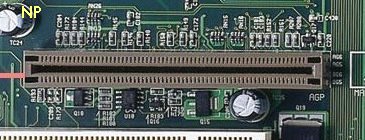
AGP (Accelerated Graphics Port) see pic
The AGP type of bus slots created for the high demands of 3D graphical software. The 32-bit AGP channel directly links the graphics controller to the main memory. While the channel runs at only 66 MHz, it supports data transmission during both the rising and falling ends of the clock cycle, yielding an effective speed of 133 MHz.
Intel designed the Accelerated Graphics Port, or AGP. Intel defines AGP as a "high performance, component level interconnect targeted at 3D graphical display applications and is based on a set of performance extensions or enhancements to PCI." In short, AGP uses the main PC memory to hold 3D images. In effect, this gives the AGP video card an unlimited amount of video memory. To speed up the data transfer, Intel designed the port as a direct path to the PC's main memory.
AGP sounds groundbreaking, and it is, no doubt, the latest craze in the need for graphical speed. One reason it is faster than PCI is that, while PCI runs at 33MHz, the AGP bus runs much faster. A 4X AGP bus runs at 4 times 33MHz, or 133MHz! Also, a normally clocked PCI bus can achieve a throughput of 132MB/s. Yes, this is fast, but when compared to the throughputs of 3D games, one finds that it is not enough. AGP, running in 2x mode (2 x 33 = 66MHz), can achieve a throughput of 528MB/s! AGP pulls this off by constantly transferring data on both the rises and falls of the 66MHz clock cycle. Also, AGP makes use of sideband transfers and pipelining so it can constantly transfer data without depending on other components in the PC.
AMR (Audio Modem Riser) see pic
Intel's specification on motherboard design. Motherboard with this type of architecture allows for designs w/o analog I/O functions. However, these functions can be added by the codec chip on a riser card, which plugs into the motherboard perpendicularly, resulting in better audio quality.
CNR (Communications and Networking Riser) see pic
The CNR specification provides the PC Industry the opportunity to deliver a flexible and cost reduced method of implementing LAN, home networking, DSL, USB, wireless, audio and modem subsystems widely used in today's "connected PCs". The CNR Specification is an open industry specification and is supported by OEMs, IHV card manufacturers, silicon supplier and Microsoft.
|