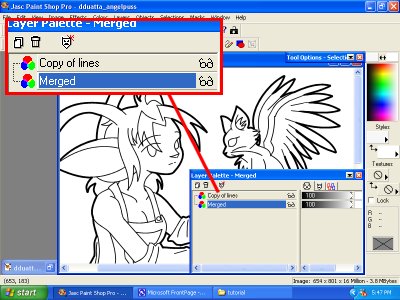
Duplicating the lines layer will help with coloring later. To do this, right click the “lines” layer and click “duplicate” from the drop down menu. It will create a new layer called "Copy of lines." Turn off the visibility of this layer by clicking the little eyeglasses next to the name of the layer on the layers palette. At the top of the screen, go to "Layers," then "Merge," then "Merge Visible." If it won’t let you, make sure the “copy of lines” layer is not highlighted. You should now only have two layers, as seen in Fig. 7.
|