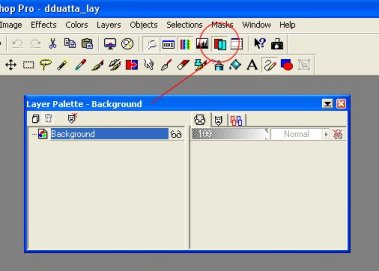
First, scan in your picture. This will serve as the basic sketch on the bottom layer. It doesn't matter how messy your sketch is... you won't see it when you're done. Once you have your scanned sketch open, open the layers palette (Fig. 1) and go to "Layers," then to "New Raster Layer" on the top bar to create a new layer. Do this twice. You should now have three layers. Right click the top layer, click "rename," and rename it "lines." Do the same for the middle layer, and rename it "white." The layer called "background" is the default layer that your sketch resides on. An example of this is in Fig. 2.
|