Okay now its
time for me to explain how a character gif is properly done. The first
mistake made by alot of gif makers now is where you choose to make it.
Dont ever try to make a gif in Animation shop Pro 3. There aren't alot
of tools that could properly make a character gif. Its makes it more harder
to work around, and takes alot longer to complete a character gif. Thats
why I say to download both anim3 and psp7.
Im going to
show you how I make my character gifs, by making a gif of Andriod 18. K
the first thing you should do is find a character that looks similar to
18, and since
I already done 17, 18 could be easily done from him. The 2nd thing you
do is use the exporting tool
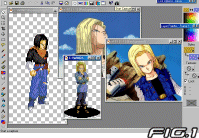
to export the 17 frame to psp7 to work with it there. Your also going to
need some pics of the characters ( I prefer you use a cel) and, and you
will have to zoom into the frame so you can see it more clearly (see fig1
). Now lets start, Im gonna start with the face. From the pic, you
can see that the only diffrence between 17 and 18 is that 17 eyes is diffrent,
her hair is a diffrent color (ofcourse), and she has a diffrent skin tone.
So lets apply this changes with the brush tool ,
and you can easily change the color of the skin with the replace color
tool. Note: Please take your time, if you dont you will winde up with the
face all messed up, the face only took me about 15 mintues to an half an
hour to be exact (see fig2 for the face end result). Do you see
how I added the 3 diffrent value's of the face, according to how it looks
in the pic, with the hair in order for me to give that stringy effect I
had to putt dark lines going down, and make the lightess value of the hair
follow it in a inverted color .
K Now that Im finish that, its time to move to the body. As you can see
from the pic, andriod 18 has a vest on, which covers up some of my work,
so the real problem hear, is making the breast look like they are there
(by adding the correct shadows) even though she is wearing something over
it. So the first thing to do is to go
over the black shirt, and bandana, with another color, since its 17, all
I have to do is use black again. After doing that you should have a clean
black shirt (see fig3) which you can add shadows and folds to it.
Make sure that you clean the black shirt so it looks like a female is wearing
it, so she shouldn't have any bold shoulders like 17. Before contining
you must first add the blue vest before doing anything else. Once thats
done its time to finish it up, and make it look as if a women was wearing
it, not a man. So in order to do that, it must be shaded properly. Once
you finish that its time to replace that color of the arms to white or
grey, so it will look like her striped shirt she is wearing. Now an important
thing gif makers dont know how to do is add value, espically when making
hd gifs you must use what is famously now as value. Value is like diffrent
shades of a color, like for example white grey and black. An
example of value, is the black circle on top. You most also now how to
shade, and now when fold occurs, to make your gif look correct now lets
continue. First Im going to make regular grey sleeves with the shadows
and stuff then I will add the stripes onto it (see fig4).
Now
it time to rap things up, since were doing 18, we'll have to do a skirt,
and those bluish greyish stockings, for the legs. Now with a skirt the
folds are alittle bit diffrent, since it wrap around tightly, the folds
will be more tightly, like in a regular pic of 18, after doing the folds
just simply shade it in correctly, it should look similar to fig
5. Now
looking on how 17 stands, you can see its more straight, and up right,
than all lop sided like my 18 frame, so the legs are going to be more staightened.
To do this, simply draw 2 simple up right legs over it.
After you do that, simply draw the boots and your done. Now its time for
the touch ups, try to look on whatever gif your doing for any simple mistakes
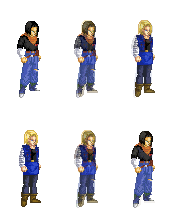
done. After Ive fiish my touchups, its time to compare. Ive chosen to compare
17 with 18. Here is diffrences with the 2 of them:
Finish Project:
More coming soon................










 since
I already done 17, 18 could be easily done from him. The 2nd thing you
do is use the exporting tool
since
I already done 17, 18 could be easily done from him. The 2nd thing you
do is use the exporting tool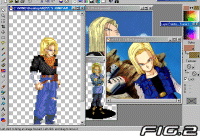 can see that the only diffrence between 17 and 18 is that 17 eyes is diffrent,
her hair is a diffrent color (ofcourse), and she has a diffrent skin tone.
So lets apply this changes with the brush tool
can see that the only diffrence between 17 and 18 is that 17 eyes is diffrent,
her hair is a diffrent color (ofcourse), and she has a diffrent skin tone.
So lets apply this changes with the brush tool 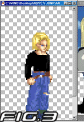 go
over the black shirt, and bandana, with another color, since its 17, all
I have to do is use black again. After doing that you should have a clean
black shirt (see fig3) which you can add shadows and folds to it.
Make sure that you clean the black shirt so it looks like a female is wearing
it, so she shouldn't have any bold shoulders like 17. Before contining
you must first add the blue vest before doing anything else. Once thats
done its time to finish it up, and make it look as if a women was wearing
it, not a man. So in order to do that, it must be shaded properly. Once
you finish that its time to replace that color of the arms to white or
grey, so it will look like her striped shirt she is wearing. Now an important
thing gif makers dont know how to do is add value, espically when making
hd gifs you must use what is famously now as value. Value is like diffrent
shades of a color, like for example white grey and black. An
go
over the black shirt, and bandana, with another color, since its 17, all
I have to do is use black again. After doing that you should have a clean
black shirt (see fig3) which you can add shadows and folds to it.
Make sure that you clean the black shirt so it looks like a female is wearing
it, so she shouldn't have any bold shoulders like 17. Before contining
you must first add the blue vest before doing anything else. Once thats
done its time to finish it up, and make it look as if a women was wearing
it, not a man. So in order to do that, it must be shaded properly. Once
you finish that its time to replace that color of the arms to white or
grey, so it will look like her striped shirt she is wearing. Now an important
thing gif makers dont know how to do is add value, espically when making
hd gifs you must use what is famously now as value. Value is like diffrent
shades of a color, like for example white grey and black. An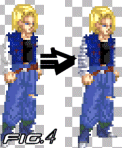 example of value, is the black circle on top. You most also now how to
shade, and now when fold occurs, to make your gif look correct now lets
continue. First Im going to make regular grey sleeves with the shadows
and stuff then I will add the stripes onto it (see fig4).
example of value, is the black circle on top. You most also now how to
shade, and now when fold occurs, to make your gif look correct now lets
continue. First Im going to make regular grey sleeves with the shadows
and stuff then I will add the stripes onto it (see fig4).
 Now
looking on how 17 stands, you can see its more straight, and up right,
than all lop sided like my 18 frame, so the legs are going to be more staightened.
To do this, simply draw 2 simple up right legs over it.
Now
looking on how 17 stands, you can see its more straight, and up right,
than all lop sided like my 18 frame, so the legs are going to be more staightened.
To do this, simply draw 2 simple up right legs over it.
 After you do that, simply draw the boots and your done. Now its time for
the touch ups, try to look on whatever gif your doing for any simple mistakes
done. After Ive fiish my touchups, its time to compare. Ive chosen to compare
17 with 18. Here is diffrences with the 2 of them:
After you do that, simply draw the boots and your done. Now its time for
the touch ups, try to look on whatever gif your doing for any simple mistakes
done. After Ive fiish my touchups, its time to compare. Ive chosen to compare
17 with 18. Here is diffrences with the 2 of them: