
Back to Piglet's Home Page/Back to Computer Science
COSC243 - lecture10
Stallings "Computer Organisation and Architecture" Ch4.3 pg117-136
Fast but expensive temporary memory.
Close to the CPU - between the main memory and the CPU. The CPU will first retrieve data from the cache.. If it is not in the cache, the data is first loaded from the main memory into the cache, and then taken by the CPU from the cache. The chance of the CPU finding a particular piece of data in the cache is called it's "hit rate".

Blocks of main memory map into lines of cache memory. Each block/line consists of a number of words/cells - usually quite small (optimally between 2 and 8). At any one time the cache will contain a subset of the main memory.
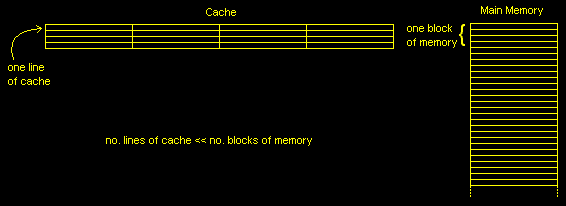
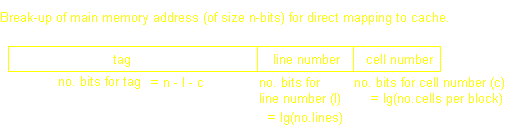
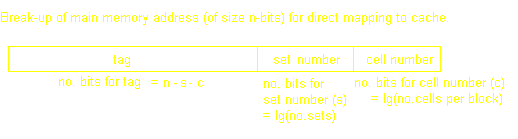
Each memory block in the main memory can only be sent to one line. As there are alot more blocks of main memory than lines of cache, many blocks of main memory will map to a single line of cache. One of the disadvantages of this type of mapping is that it can lead to "thrashing": replacing a block of memory that is again immediately needed. The main memory address is split into a tag, line number, and word number.

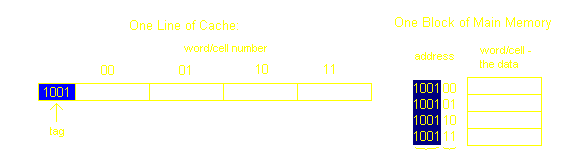
Let us take an example. Say we have 64bytes of main memory, and each word/cell is only one byte. Then we need lg64=6 bits to address each cell. Now let us say that each block is composed of only four cells (thus we have a total of 64cells/(4cells/block)=16blocks). Now let us pretend that our Cache memory is only 16bytes. That gives us 16bytes/(4cells/line)=4lines (the number of cells per line will always be the same as the number of lines). We can now think of our cache memory as a grid of line numbers and cell numbers.

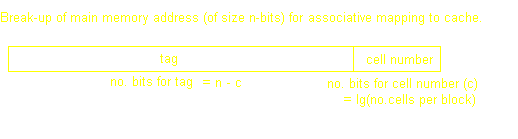
Unlike direct mapping, any block from main memory can appear on any cache line. Thus we don't bother indexing the line (just the cell with the least significant bits from the main memory address). The remainder of the address is the tag, and to find out which line of cache we are dealing with, the tag on each line has to be compared to that part of the address we want untill we reach the correct line. This is done simultaneously (else would take quite awhile as you could imagine) - but the circuitry required is complex and expensive.
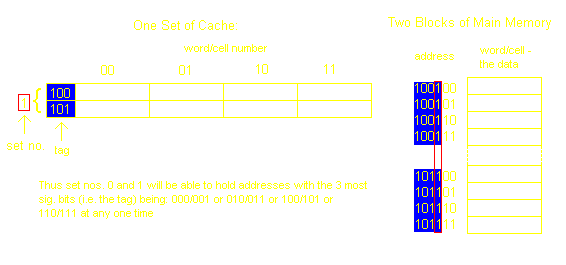
The lines of cache are grouped into indexed sets. Each set is only 2 or 4 lines. In this way we have direct mapping to the set, but associative mapping to the line in the set. It is a good comprimise between the two.
Of course, this is not an issue for Direct Mapping as there is only one possible line in the cache where any particular block of memory can go. The following mostly applies to Associative, but also Set Associative (although the choice here will only be one of 2 or 4 lines):
Not good if executing a loop that is slightly larger than the cache. Works easily for two-way set associative - use an extra bit (per line) that is set if most recently used, so replace the line with this bit set to 0.
Easy to Implement, but again not good if program loop slightly larger than cache
The problem of calculating it.
Actually quite effective - don't spend time deciding which one to throw out. Works quite well in a mix/variety of programmes. Burroughs (now Unisys) came up with the idea.
This is easy if we are replacing a line that hasn't been modified - but this isn't always easy to determine, especially as many I/O devices may have access to the cache...and several processors may have their own cache. So, we need to maintain the validity between main memory and all caches.
All write operations to cache are also written to main memory...
...but then all other processor caches must monitor traffic to maintain consistancy.... this generates substrantial memory traffic and may cause a bottleneck.
Updates are only made to cache. Each line of cache has an associated ubdate ("dirty") bit so that when wanting to overwrite a line, the former one in written to main memory only if this bit is set.
...this means that parts of the main memory may no longer be valid if their value is changed in cache, so all modules must first access the cache first to see if their memory cell is there first...this again leads to complex circuitry and possible bottlenecks.
Each processor has a bus master that watches when other processors write through to the main memory - if detected for one of the addresses it has in it's own cache, renders it's own cache data invalid
Additional hardware updates all caches when a write through occurs.
Any memory which more than one processor is trying to access (identified with chip-select logic or high address bits) is deemed noncachable and must be accessed directly from the main memory
