Site hosted by Angelfire.com: Build your free website today!

Crazy Broadband _For My Personal Use _ ( Internet Explorer users only)

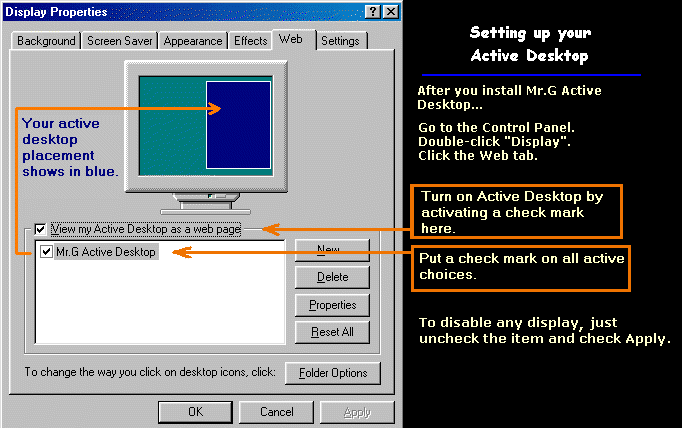
Music Videos Download FREE.     How to enable Active Desktop 


Current Projects


Back to Top


Broadband Forms

Transmission occurs after clicking the SUBMIT button.


Back to Top


Websites

____Limited or Windows 2000/XP ____Latin Music


Back to Top


Hot Video PlayList


Automatic Playlists

Save Full-Screen to Desktop

Microsoft Reference Info

Back to Top


Add Active Desktop

                                                                       Try these Active Desktop Features


Try these attractive active windows on your desktop. After you install a feature you can
disable/enable the feature by clicking .. Start, Settings, Active Desktop, Customize My Desktop.
Insert a check mark for the window you want to view, and Apply the change. An alternate way is to click on the Desktop window then the drop down arrow (top left of the window) then click Customize My Desktop.


Back to Top


Comments and Suggestions


Send an online message...

From:

To:

Subject:

Comments:


Back to Top

Testing DSL Performance _____Back to Top

What is the Westell Modem Browser and how can I interpret it's results?

 The Westell DGN Icon aka Westell Modem Browser is a utility that will allow you, an owner of a product and a subscriber to a service to have some gauge of the actual performance of your modem.

The utility is downloadable directly from Westell: »https://
www.westell.com/content/downloads/diagnostic.exe however there seem to be two "packages" of this utility. One of them will upgrade a modem to FW 06.01.02 which is required.

Along with the firmware and tranceiver revision, it will display:

a)
DSL signal levels including noise margin, output power and attenuation. It will also display your "actual" ATM sync level, ie provisioning.

b)
ATM Rx and Tx traffic cell count including counters for invalid and dropped cells, OAM pings (control cell count), encapsulation type, AAL PDU metrics and Ethernet frame statistics.

c)
Error counters include FEC, HEC, CRC, Sync loss, Frame loss and others.

d) It will not display the maximum attainable sync on your line, only it's current provisioning, however by looking at the DSL signal levels you can get a rough idea of how your line stacks up. This utility will not replace a test kit or an EWL and isn't meant to.

All of the above is loggable to a standard ascii, comma deliniated log which is easily graphed or further processed.

Once installed, don't forget to use ** CTRL-ALT-F7 ** to reveal several "hidden" tabs, the signal levels and error counters, so forth.

I strongly suggest reading the following threads before trying to install or interpret any results from this cool little program:

Some more material
------------------
»Westell Diags
If you're an owner of one of the current Westell ADSL models A90/B90-2100 Westell has made the A90/B90-2100 (current models) diagnostic utility at their website here (*mainly for Verizon users but applicable based: »https://
www.westell.com/pages/verizon.jsp

Back to Top

Protect Your PC _____ Back to Top

Use Spyware Blaster,Spyware Guard & CCleaner to protect your PC.
No more annoying popup messages asking you what to do.
Spyware Blaster 3.5.1 -----Download FREE-
Absolutely the most reliable and powerful protection program.
  • Prevents the installation of ActiveX-based spyware, adware, browser hijackers, dialers, and other potentially unwanted software.
  • Blocks spyware/tracking cookies in Internet Explorer and Mozilla/Firefox.
  • Restricts the actions of potentially unwanted sites in Internet Explorer.

  • SpywareGuard 2.2 ------Download FREE
    Detect browser hijacking attempts and more as they are happening.
    Catch and block spyware and browser hijacking attempts before it is executed.


    CCleaner ------Download FREE
    CCleaner is a PC optimization tool, that removes unused and temporary files from your system - allowing Windows to run faster, more efficiently and giving you more hard disk space. The best part is that it's Small, Fast and Free! I use it to clean out temporary internet browsing files when I restart the computer.
    Back to Top

    Copyright information goes here.
    Last revised: June 17, 2007.