 |
 Tubes can be made from any object or picture; this tutorial explains one method of isolating one part of a graphic and making it into a tube.  In a nutshell, all you need to do is delete all the extraneous background around your selection, select the background (which should now be all one color) and invert to make your chosen part of the picture the selected item. Copy or cut and paste it to a new graphic, resize if necessary, then export it to your tube folder. In a nutshell, all you need to do is delete all the extraneous background around your selection, select the background (which should now be all one color) and invert to make your chosen part of the picture the selected item. Copy or cut and paste it to a new graphic, resize if necessary, then export it to your tube folder. For this tutorial, I'm using a picture I have in my CD clipart collection.
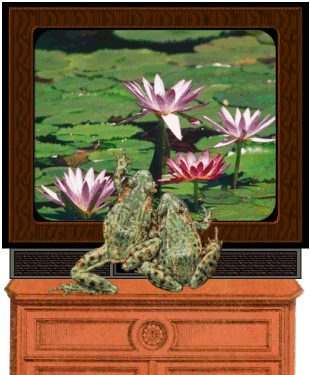
Note: I worked with a large graphic, so the frog graphics are all thumbnails, except for the graphic I made utilizing the tube; which is almost full-size. |

 the marching ants are selecting almost all the background, but also a few sections inside the frogs (circled in red). If I lower the tolerance threshhold, it keeps the frogs from being invaded by the ants, but it doesn't smoothly select all of the very slightly textured background. To fix the problem, I deselected the background and fixed the outlines of the sections that were affected. Use the magnifying glass to zoom in to the areas that need to be fixed; what you're looking for is sections where the outline is fuzzy or very light.
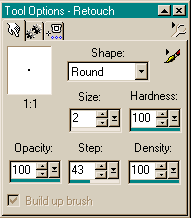 make sure Push is set as the Retouch Mode. I used the settings shown here for this project; they will vary depending on your graphic. For smaller areas, I changed the size to 1. Set the tool directly on the dark part of the outline and "push" it over to join the other section. Do this on all the outline areas that need to be joined.
 Another way to do this is to use the dropper tool to select one of the dark colors in the outline then use the paintbrush to paint over the light section. This makes a more solid and noticeable line, but if you're working with a large graphic that you'll be reducing later, the outline will 'fuzz; enough to be unnoticeable. Sometimes you'll need to do a combination of the two methods. You can push the background around to trim the outline where it's too thick.
 if you have missed any areas (pay particular attention to the eyes on the lefthand frog), deselect everything and go back and fix them. Once you have fixed them all, hold the shift key in and click on each part of the background. Press the delete key. If you're using my graphic for practice, you should now see only the outline of the globe for the background. Deselect everything again.
 use the eraser, make sure your background color on the style selector matches your current background. If you use the paintbrush, click on the jointed arrow to flip the background color to the foreground color. (Background color doesn't matter if you use the push tool). Change the tool size to about 40 or 50 and clean up the globe outlines. As you get in closer to the frogs, reduce the size of the tool. When all the big stuff is gone, your brush or push size should be about 2 again. Then you'll get in close and get rid of all the small areas next to the frogs. The better you clean it up, the better your final tube will look. The reason for the blue background was so I could distinguish the sections that need to be cleaned up easier. After you've done all the cleanup, click again on the background. The marching ants should be clean and snug against the frogs.

 |
Questions? Problems? Suggestions? Please e-mail me at RaggBagg; I usually get back to my e-mail queries within a day or so.

|