This is my little Animated GIF Tutorial. Its made for someone with
intermediate knowledge of their programs. Remember that the way I'm describing this
tutorial to be executed using Fractal Painter, but I'm pretty sure the steps can
also be done in Adobe Photoshop.

1. First you have to have an idea of how you
want your animation, and of what type of movements and effect you want your animation to
have such as flashes, wiggles, ya know what I mean.... :)
2. Compose different frames (picture by picture)
3. Below is a picture of an animated GIF
that was cut up. This shows you frame-by-frame what the gif looks like in a static mode.
"1" Is the first frame, "15" is the middle of animation. Using
Animagic GIF, I will then duplicate all 15 frames and reverse them, creating a
smooth animation.
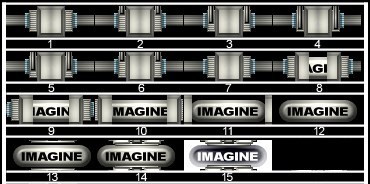
- 1 shows the beginning of the animation. The Box or Fence thing is closed over the
imagine button.
- 2 shows 2 little bar's which will come down and give an effect of the box being sealed.
- 5 shows the 2 bar's coming back up, unlocking the box.
- 8 shows the box beginning to slide open revealing the "imagine" button.
- 12 shows the button complety revealed.
- 13 shows some kind of machine coming in from the top & bottom towards the
button.
- 15 shows the machine "electrocuting" the button, for the
"electrocution" effect I simply made the whole frame negative.
The final animation:

4. Finally to put all of the animations together you must
do one of the following:
- If you are using Fractal Painter like me, Then the animator is enough for putting
it all together, just go to "File" > "Save As" >[GIF]
- If you are using any other program such as Adobe Photoshop, you will have to save
each frame and put them all together using a GIF program such as Animagic GIF,
Ulead GIF animator........
- With whatever GIF Editor you will use, to get a nice effect you will have to
speed up, and slow down certain frames to get a nice effect.
5. GIF Effects
- Lightning: Simply instert a pure blank white frame in the animation.
- Electrocution: Just make the frame you want to electrocute a negative
(effect > tonal control > negative)
- Earthquake/rattle/jiggle: simply take an object and move it a few pixels left,
then right , then left...... It'll give a nice effect.
- Use Plugins!!!! Experiment with all of your plugins, you can achieve
astonishing effects in an animation....
- HAVE FUN Animating Gif's is a hobby... if you don't like it then don't
do it.. try to have fun!
© All images & Content by Alan Suel 1997-1998 ©




