|
Pete` Guide to extracting Dreamcast Images with NERO |
| I have tried to make this as simple as possible - if you have any problems re-trace your steps, otherwise mail me for bugs - This Tutorial was done using NERO 5590 |
| 1: Load Nero - If the WIZARD starts - close it |
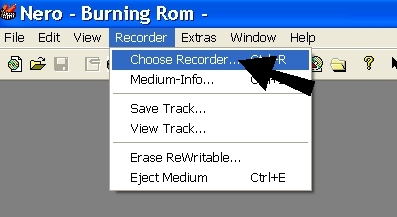
| 2: From the top select RECORDER>CHOOSE RECORDER. |
|
|
| 3: From the list of CD devices - Select the Image recorder - then press OK |
|
|
| 4: Now select the "New Compilation" button. |
|
|
| 5: Select the "Wizard" button. |
|
|
| 6: Select the CD option then Press Next |
|
|
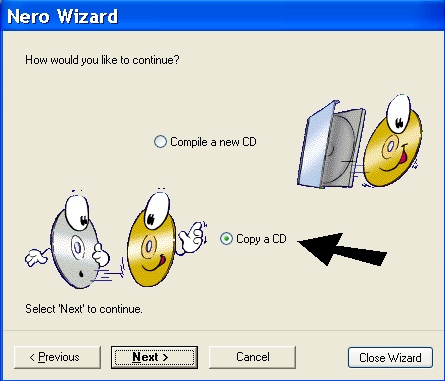
| 7: Select Copy CD then press Next |
|
|
| 8: Now - Select the CD drive that has the Dreamcast CD. from YOUR list of available CD devices - then press Next. |
|
|
| 9: Click on the Burn Button |
|
|
| 10: You will now be presented with a Save Image File - window - Select the Folder where you want to save the image file - NOTE - you can also rename the "image" to the name of the game image you are creating. |
|
|
| 11: Your new image file is ready to be Compressed using either WINRAR or WINZIP. |
|
Good Luck.. Pete |