
Title:
Horacio Moreno ITEC 5321 Spring 2006
Lab Narrative and Reflections
Footprinting Using Linux, Linux and Windows File Access Control, MBSA and CIS, and Windows Encryption
Purpose:
The purpose is to gather information about an organization using the web. This usually provides only limited information, but occasionally it can uncover a valuable clue about the organizing and its systems. The lab was also intended to help us understand the Linux file system access control. Also the lab aids in understanding web browser security and configuration as well as hardening Windows and its local policy. Finally the lab aids in learning Windows access control and encryption.
Tools:
Firefox, a linux shell, internic.net, arin.net/whois, the whois, host (in place of using nslookup), dig, ping, and traceroute commands are all used. Several basic linux and windows file system commands were also used. Windows 2000, the MMC console, Microsoft Baseline Security Analyzer (MBSA) and the CIS Windows Scoring Tool were also used.
Lab 1B-1 Web Reconnaissance
Lab 1B-2 DNS Interrogation with Linux
Lab 1B-3 Network Reconnaissance with Linux
Lab 7B-1 Linux File System Access Control
Lab 7B-2 Web Browser Security and Configuration (Mozilla)
Lab 3A-3 Windows O/S Hardening and Local Policy (MBSA)
Lab 7A-1 Windows Access Control / Encryption
Procedures:
First internic.net was used to whois the
knoppix@0[knoppix]$ whois uh.edu
This Registry database contains ONLY .EDU domains.
The data in the EDUCAUSE Whois database is provided
by EDUCAUSE for information purposes in order to
assist in the process of obtaining information about
or related to .edu domain registration records.
The EDUCAUSE Whois database is authoritative for the
.EDU domain.
A Web interface for the .EDU EDUCAUSE Whois Server is
available at: http://whois.educause.net
By submitting a Whois query, you agree that this information
will not be used to allow, enable, or otherwise support
the transmission of unsolicited commercial advertising or
solicitations via e-mail.
You may use "%" as a wildcard in your search. For further
information regarding the use of this WHOIS server, please
type: help
--------------------------
Domain Name: UH.EDU
Registrant:
Information Technology / Computing & Telecommunication Services
UNITED STATES
Contacts:
Administrative Contact:
Dennis Fouty
4800 Calhoun
UNITED STATES
(713) 743-1100
Technical Contact:
Alan Pfeiffer-Traum
UNITED STATES
(832) 842-4631
apt@uh.edu
Name Servers:
NS1.UH.EDU 129.7.1.1
NS2.UH.EDU 129.7.1.6
MESQUITE.CC.UH.EDU 66.140.111.1
NCC.UKY.EDU 128.163.1.6
Domain record activated: 21-Oct-1987
Domain record last updated: 27-Jul-2005
We then moved on to Inverse Mapping. Inverse mapping allows you to gather information about an organization with its IP address. The command [host www.microsoft.com] was used to obtain the IP address first then we used the command [host 207.46.19.30] to verify it was Microsoft IP address.
knoppix@0[knoppix]$ host www.microsoft.com
www.microsoft.com is an alias for toggle.www.ms.akadns.net.
toggle.www.ms.akadns.net is an alias for g.www.ms.akadns.net.
g.www.ms.akadns.net is an alias for lb1.www.ms.akadns.net.
lb1.www.ms.akadns.net has address 207.46.19.30
lb1.www.ms.akadns.net has address 207.46.19.60
lb1.www.ms.akadns.net has address 207.46.20.30
lb1.www.ms.akadns.net has address 207.46.20.60
lb1.www.ms.akadns.net has address 207.46.198.60
lb1.www.ms.akadns.net has address 207.46.199.30
lb1.www.ms.akadns.net has address 207.46.225.60
lb1.www.ms.akadns.net has address 207.46.18.30
www.microsoft.com is an alias for toggle.www.ms.akadns.net.
toggle.www.ms.akadns.net is an alias for g.www.ms.akadns.net.
g.www.ms.akadns.net is an alias for lb1.www.ms.akadns.net.
www.microsoft.com is an alias for toggle.www.ms.akadns.net.
toggle.www.ms.akadns.net is an alias for g.www.ms.akadns.net.
g.www.ms.akadns.net is an alias for lb1.www.ms.akadns.net.
knoppix@0[knoppix]$ host 207.46.199.30
Host 30.199.46.207.in-addr.arpa not found: 3(NXDOMAIN)
Since the previous command didn’t confirm it was Microsoft we used arin.net/whois which verified that the IP we got was from Microsoft.
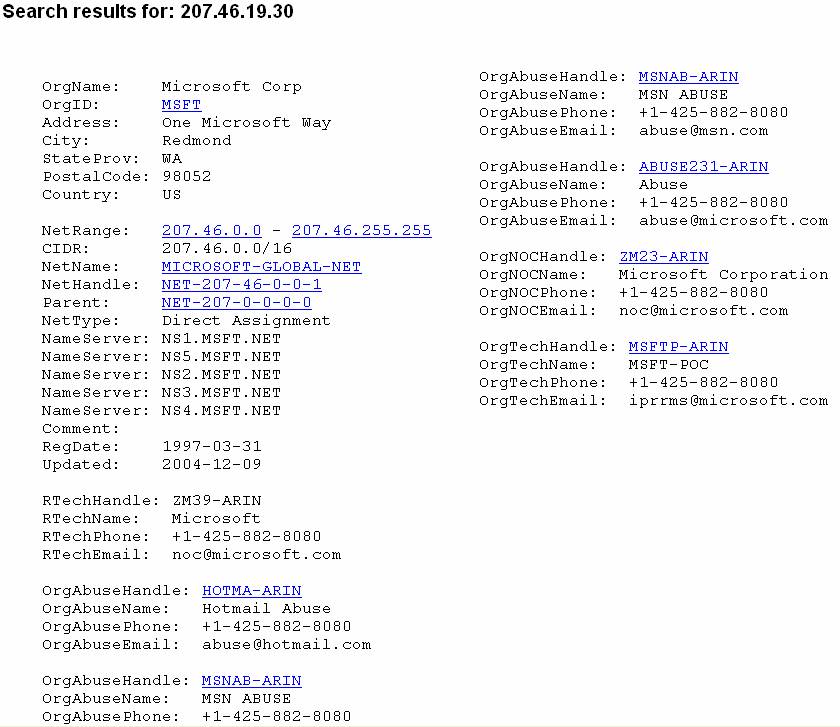
Next, we used the command [dig Microsoft.com] which is used much like the host command.
knoppix@0[knoppix]$ dig microsoft.com
; <<>> DiG 9.3.1 <<>> microsoft.com
;; global options: printcmd
;; Got answer:
;; ->>HEADER<<- opcode: QUERY, status: NOERROR, id: 42392
;; flags: qr rd ra; QUERY: 1, ANSWER: 2, AUTHORITY: 0, ADDITIONAL: 0
;; QUESTION SECTION:
;microsoft.com. IN A
;; ANSWER SECTION:
microsoft.com. 1598 IN A 207.46.130.108
microsoft.com. 1598 IN A 207.46.250.119
;; Query time: 2 msec
;; SERVER: 192.168.0.50#53(192.168.0.50)
;; WHEN: Thu Mar 2 02:32:52 2006
;; MSG SIZE rcvd: 63
Then we ran the [host –t mx uh.edu] to see if Microsoft had any exchange mail servers available and as you can see it has three.
knoppix@0[knoppix]$ host -t mx microsoft.com
microsoft.com mail is handled by 10 mailb.microsoft.com.
microsoft.com mail is handled by 10 mailc.microsoft.com.
microsoft.com mail is handled by 10 maila.microsoft.com.
Network reconnaissance is a set of activities designed to map out the size and scope of a network using internet utilities. That is why next we used the command [ping 128.42.5.4] which corresponds to rice.edu. The results indicate the minimum, maximum, and average return times for our ping and the percent of packet loss during transmission.
knoppix@1[knoppix]$ ping 128.42.5.4
64 bytes from 128.42.5.4: icmp_seq=0 ttl=111 time=23.4 ms
64 bytes from 128.42.5.4: icmp_seq=1 ttl=111 time=23.4 ms
64 bytes from 128.42.5.4: icmp_seq=2 ttl=111 time=22.6 ms
64 bytes from 128.42.5.4: icmp_seq=3 ttl=111 time=22.0 ms
64 bytes from 128.42.5.4: icmp_seq=4 ttl=111 time=23.3 ms
64 bytes from 128.42.5.4: icmp_seq=5 ttl=111 time=22.9 ms
64 bytes from 128.42.5.4: icmp_seq=6 ttl=111 time=22.6 ms
64 bytes from 128.42.5.4: icmp_seq=7 ttl=111 time=23.2 ms
64 bytes from 128.42.5.4: icmp_seq=8 ttl=111 time=23.4 ms
64 bytes from 128.42.5.4: icmp_seq=9 ttl=111 time=22.9 ms
64 bytes from 128.42.5.4: icmp_seq=10 ttl=111 time=23.5 ms
--- 128.42.5.4 ping statistics ---
11 packets transmitted, 11 packets received, 0% packet loss
round-trip min/avg/max = 22.0/23.0/23.5 ms
After that we used the command traceroute uh.edu to find specific information on the path the packet takes form the sender us to the destination UH. The small astericks at the bottom probably indicate servers in the hops that are not listening for ICMP echo requests.
knoppix@1[knoppix]$ traceroute uh.edu
traceroute to uh.edu (129.7.235.44), 30 hops max, 38 byte packets
1 sl-st20-dal-4-0.sprintlink.net (144.228.250.109) 19.803 ms 17.272 ms 17.709 ms
2 144.232.8.226 (144.232.8.226) 22.253 ms 17.271 ms 16.476 ms
3 p16-6-0-0.r02.hstntx01.us.bb.verio.net (129.250.5.101) 24.048 ms 24.559 ms 23.850 ms
4 ge-1-1.r04.hstntx01.us.bb.verio.net (129.250.3.90) 24.932 ms 25.006 ms 25.304 ms
5 ge-0-2-0.a03.hstntx01.us.ra.verio.net (129.250.29.89) 24.061 ms 23.918 ms 24.030 ms
6 a1-1-2-1-2.a03.hstntx01.us.ce.verio.net (128.241.11.50) 26.111 ms 25.312 ms 26.084 ms
7 Domitillia.gw.uh.edu (129.7.131.145) 26.658 ms 26.219 ms 26.569 ms
8 vespasian-vlan10.gw.uh.edu (129.7.254.254) 26.911 ms 25.472 ms 27.317 ms
9 * * *
10 * * *
We then moved on to do labs with file system security issues by using some Linux commands.
Then we moved on to web browser security and configuration. Here are a couple of screenshots that were taken from Firefox’s advance security preferences tab. Some of these settings should be adjusted depending on the situation.
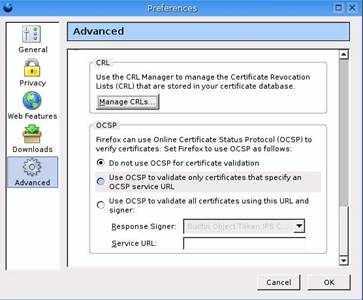
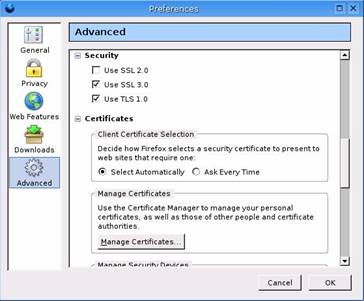
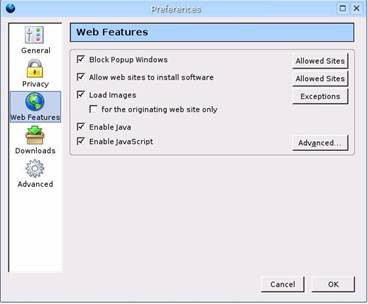
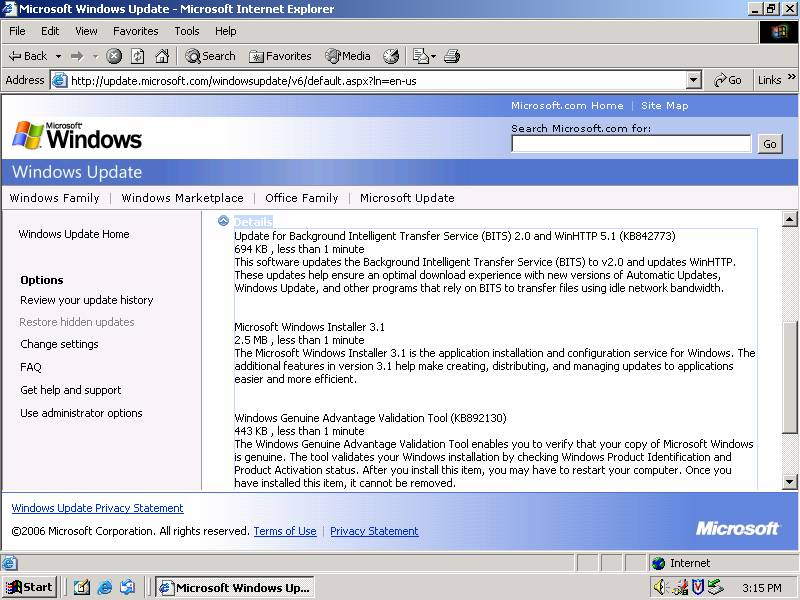
We then moved to Windows OS hardening and local policy. First as you can see from the screenshot below we ran Windows Update to apply the latest security patches.
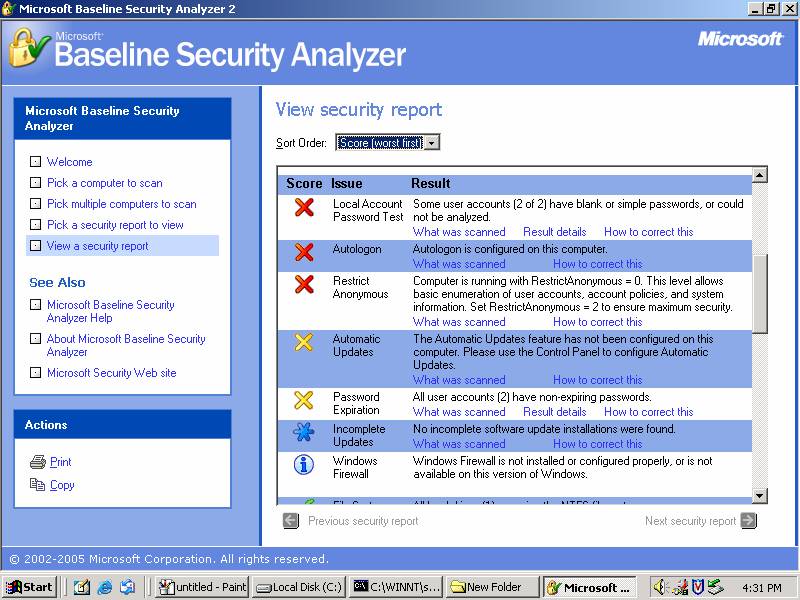
Then we installed and ran the MBSA to baseline our system and to determine what other measures to take to harden are system even more. Here is a screen shot of the results and this link will take you to a report of the results.
Then we ran the CIS Windows Scoring Tool to further test the security of our system. Here are links to both before and after results windows security patches were installed.
After running MBSA and CIS it was time to harden up our system. That’s way we ran the MMC to first figure our currently settings and then apply the most secure template available.
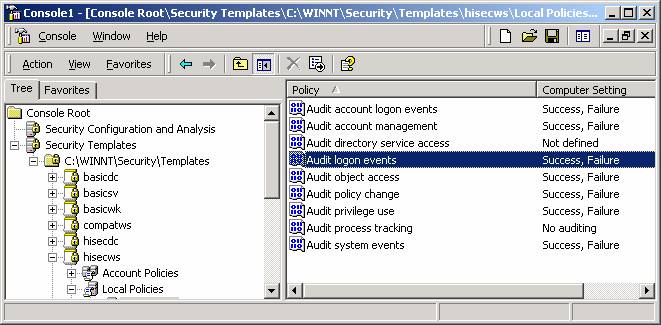
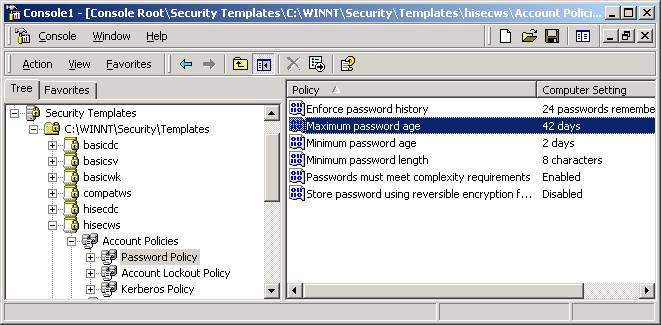
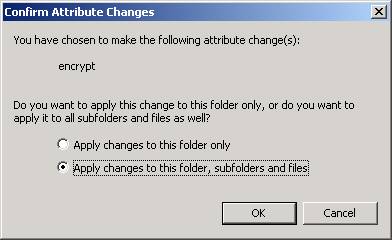
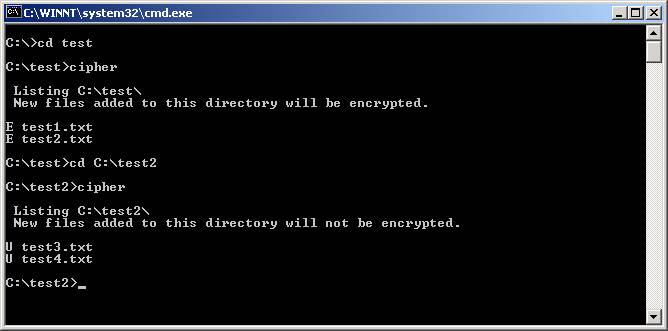
We finally concluded the lab by encrypting windows folders. We then used the cipher command to determine if files in the folder we were working on were encrypted or not.
Analysis:
A variety of tools exist to help us in footprinting to do reconnaissance on organizations without getting into legal trouble. While Linux operating systems and thereby its commands can be more difficult to learn and than those of Windows, the greater security and flexible that comes with linux is far enough greater to put up with its complexity. Using tools like MBSA and CIS can clearly help determine what policies need to be straightened out to ensure the best possible security on your systems. Encrypting files and folders is great in windows however compressing an encrypted file or folder is out of the question.
Time:
About 5 hours
Reflection:
While most of the footprinting command line Linux tools we used were useful many windows tools that do the same thing are even greater because of their graphical user interface.
