Site hosted by Angelfire.com: Build your free website today!
       
The Digital Reference Section


HTML Basics
Mr. Rodrigo Silvano
C
omputer Engineering Department
Don Bosco Technical College
 

HTML document

Document Body

<HTML>...document...</HTML>
Definition
This tag should begin and end each HTML file. It should be the outermost layer in the HTML structure.

Attributes
VERSION="URL" - Specifies the URL of the DTD which is used to interpret this document.

Use
Use this tag to enclose all HTML documents.

<BODY>...body of the document...</BODY>
Definition
This tag defines or identifies the content of an HTML document. This is the part of the document that appears in the browser.

Attributes
ALINK=(#RRGGBB|colorname) - Sets the color for the active link in the document.
BACKGROUND="ÜRL" - Points to the image location that is to be used as the background for the document.
BGCOLOR=(#RRGGBB|colorname) - Sets the background color of the document.
LINK=(#RRGGBB|colorname) - Sets the color for the links in the document.
TEXT=(#RRGGBB|colorname) - Sets the text color of the document.
VLINK=(#RRGGBB|colorname) - Sets the color for visited links in the document.


Use

Use this tag to define or set off the body of an HTML document.
Document Head Block EXAMPLE Application

<HEAD>...head...</HEAD>
Definition
This tag identifies the first part of the HTML document. It defines the information pertaining to the HTML document. This includes the title, meta-information, index information, next page pointer, and links to other HTML documents.

Attributes
PROFILE="URL" - Defines the location of a meta-dictionary or profile.

Use
This tag is needed or required at the head of an HTML document. It is a good practice to always include this in your document, especially if you want to have a base URL that has many graphics or local documents linked to your page.


This is an example HTML code using these four tags.
   
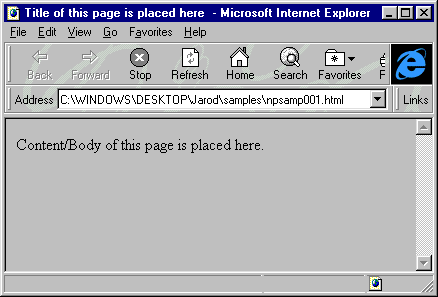
This is the generated page for the given code above.
Document Title  

<TITLE>...document title...</TITLE>
Definition
This tag encloses the title of an HTML document. This is commonly seen in the title bar of the browser's window. The default title if no title is specified is the HTML filename. This tag must appear within the <HEAD> section of the HTML document.

Attributes
None

Use
It is a good practice to place a useful title for every HTML document that you write. This can help many Web search engines and tools find your content especially if you use accurate and descriptive titles.


Horizontal Rule Example Application

<HR>
Definition
This tag draws a horizontal line across the page, usually one to two pixels wide.

Attributes
ALIGN=(LEFT|CENTER|RIGHT) - Draws the rule left-aligned, centered, or right-aligned.
NOSHADE - Draws the rule without the 3-D shading.
SIZE=number - Sets the height of the rule in pixels.
WIDTH=(number|"%") - Sets the width of the rule in pixels or as percentage of window width. In specifying a percentage, use a percent sign at the end of the number.

Use
Use this tag to give a natural division between text items or topics, or to give separation between page header and footer from the body of the document.

This is an HTML code example for the <HR> tag.
   
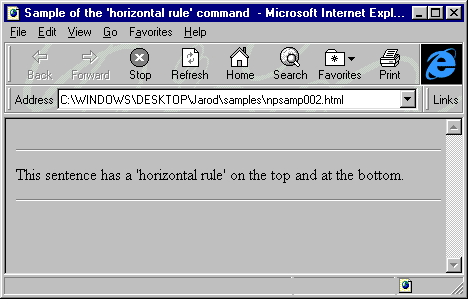
This is the generated page for the given code above.


Paragraph EXAMPLE Application

<P>...</P>
Definition
This tag defines or displays paragraph boudaries for normal text. Line break and carriage return occurs where this command is placed.

Attributes
ALIGN=(LEFT|CENTER|RIGHTJUSTIFY) - Sets the alignment of the paragraph. The default is LEFT.

Use
Use this tag to create division of related ideas or concepts within the document. It helps create better flow for the text within a document. The closing </P> tag is optional.

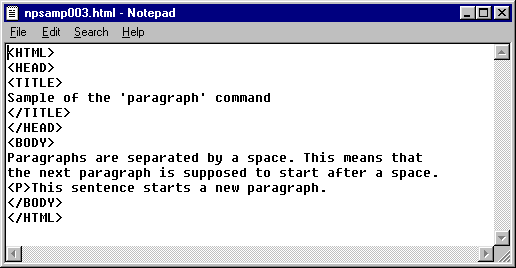
This is an HTML code example for the <P> tag.
   
This is the generated page for the given code above.

The PinoyTechZone.Com
Copyright 2002-2003
All rights Reserved