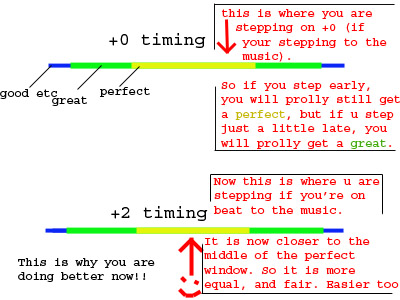
Those of you who own DDRMax or DDRMax2 may feel like you are stepping early in the arcade, but get like 3 greats at home. I felt the same way, so I did a bit of investigation on the problem. It didn't take long before I found the answer: both games are out of synch with the music. The arrows scroll slightly ahead of the beat, meaning you would step early to hit the center of the perfect window. Here are a couple of crude pics I pulled off of DDRFreak's forums to show what I mean...
Max: +6 (some use +4)
Max2: +2 (maybe +1, doesn't matter)
DDR Extreme (Japan): +2
This also explains the reason a lot of people have trouble when they go bewteen Max and Max2. Max is just so out of synch that after you adjust to playing on Max2, it's hard to go back. Keep in mind that after you adjust timings, your scores will likely be worse, especially if you've gotten in the habit of stepping early. You'll probably gain about 20 greats or so per song, but don't worry... just practice with it and you'll be a better arcade player in the end.
The second issue deals with the size of the perfect window. The arcade's is much smaller than the home versions', meaning you'll have to step more accurately for fewer greats. Unfortunately, there is no real way to solve this problem on the home version of DDR.
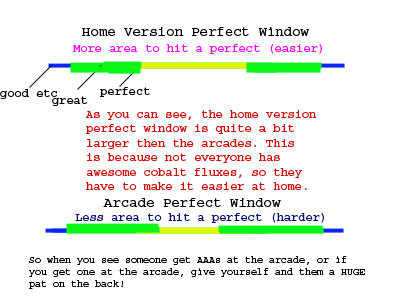
You can fix it, however, in Stepmania by editing the Stepmania.ini file in the data folder. To do this, open up Stepmania.ini and find the lines that say things about judge window, and replace them with is:
JudgeWindowAttackSeconds=0.135000
JudgeWindowBooSeconds=0.133333
JudgeWindowGoodSeconds=0.083333
JudgeWindowGreatSeconds=0.066667
JudgeWindowMarvelousSeconds=0.016667
JudgeWindowMineSeconds=0.135000
JudgeWindowOKSeconds=0.250000
JudgeWindowPerfectSeconds=0.033333
JudgeWindowScale=1.000000
That should do it as far as timing. enjoy!

