

My favorite VP Links
VP Goes Audio: Where you can leave your voice message
My personal Avatars - what i look like on VP
Click here to download AOL's VP 2.1 Program. Save it to a safe location, and follow direction below.
VP1 Reunion
Back to DrJohn's Main Page
Above is a link to download AOL VP 2.1 version client, which is needed to access the communities. Once loaded, run the program and it will install itself. When prompted, get the program to start. Initially the program is set up to access a page which no longer exists. It will give you a message like this:
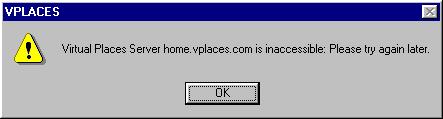
Just click "OK" to remove this prompt and you will be left with
the following screen:
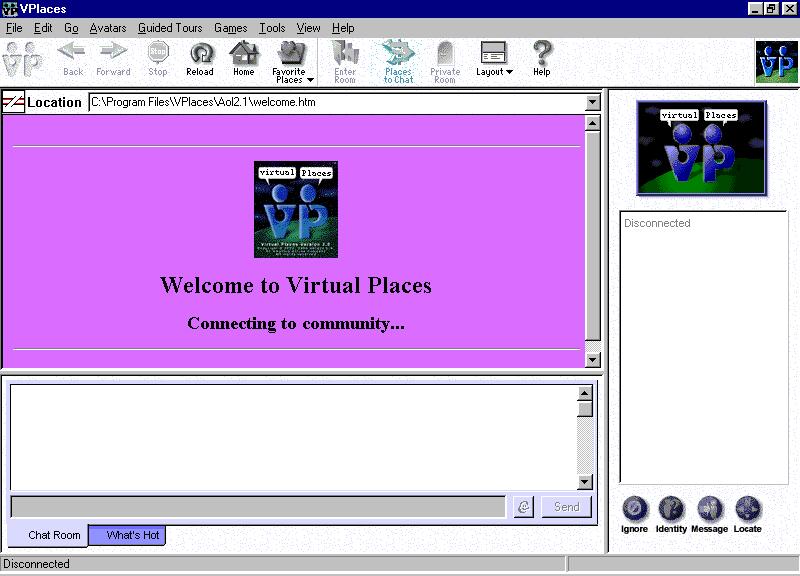
Select menu item "Tools" (at the top bar), then "Community Servers", and the
following prompt will appear:
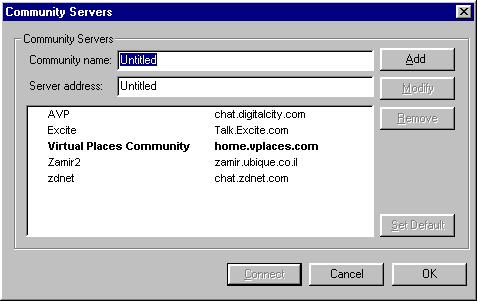
It will only have one server listed, with the "Community Name" on the left, and
the "Server Address" on the right. You will need to add the others by
entering the information in the fields and clicking "ADD" for each server
listed here.
Each server listed is host to a separate "Community", where all users can communicate with each other. Communication between communities, however, is not possible at this point.
Each community accessed will first ask you to register. You can register the same user name on each community, as long as it is not already used by someone else. Each community will then send you a email message confirming your registration, and sending you a password to access the community. RETAIN these messages, in case you cannot remember your passwords. Those passwords can be changed at anytime afterward, but they are essential to first access the communities.
