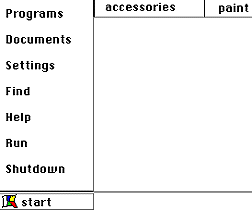
1. Simple! Using your mouse click on start with the left button.
2. Put mouse arrow on programs.
3. Pull over to the program wanted. Under accessories are games, a note pad, and paint programs.
4. Open the paint program by clicking on the name of the program once.
5. Open a game by clicking on the name of the program once.
6. Open the calculator or a calendar by clicking on the name of the program once.
7. The bottom of your tool bar now contains buttons with the names of all of these programs. You may go back and forth between programs by clicking on a button.