
 OK here's the deal. This section is for those of you who are having a problem with the extraction for the new vp software. Build#145. It says "decompression 0%'s, there may not be enough disk space left in the Temp Directory" If you are having this problem, follow the below instructions to resolve it.
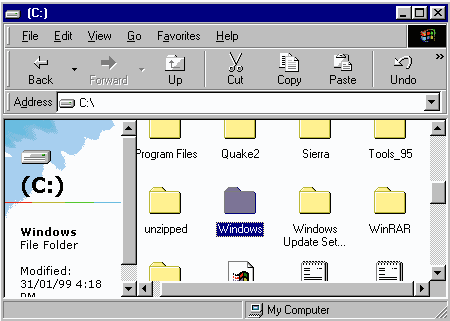 The fist thing you need to do is access you C drive. Then go to Windows and double click that folder.
 The next thing you need to do is look for the TEMP folder. Then open it.
 The third step is to go to VIEW on your tool bar at the top of the screen. Click on thats and look at the list it gives you. When you find FOLDER OPTIONS click on it.
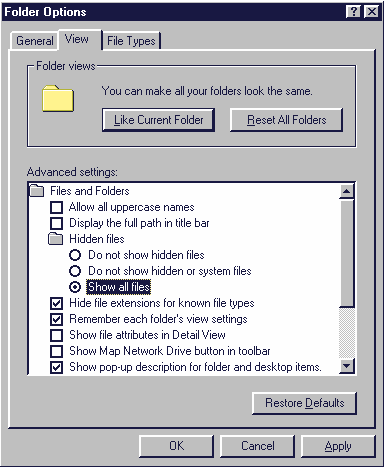 When you do this a windo will pop up with 3 different sections. General,View, and File types. Click on View, then look for a hidden folder section. You want to click on Show ALL FILES. Frome here it is simple, all you need to do is look in the TEMP folder again and delete a file called SETUP. It was from the older version of vp and was blocking the extraction process. Once you have deleted the file try unziping the new vp software and it should work, however if it does not and it still says the same thing, you HAVE THE WRONG VERSION!!!.
Oh and by the way, dont forget to hide the hidden files again so you dont go messing with any of them later. To do this follow the exact same process as the above up to the last image shown. Then instead of clicking on SHOW ALL FILES, click on DO NOT SHOW HIDDEN FILES and hit apply. Your all set to go now.
When you do this a windo will pop up with 3 different sections. General,View, and File types. Click on View, then look for a hidden folder section. You want to click on Show ALL FILES. Frome here it is simple, all you need to do is look in the TEMP folder again and delete a file called SETUP. It was from the older version of vp and was blocking the extraction process. Once you have deleted the file try unziping the new vp software and it should work, however if it does not and it still says the same thing, you HAVE THE WRONG VERSION!!!.
Oh and by the way, dont forget to hide the hidden files again so you dont go messing with any of them later. To do this follow the exact same process as the above up to the last image shown. Then instead of clicking on SHOW ALL FILES, click on DO NOT SHOW HIDDEN FILES and hit apply. Your all set to go now.

