
Random Access Memory (RAM):
When people speak of memory, they are usually referring to RAM. Physically RAM is what is called an inline memory module. Below in the drawing you will see that it is a row of chips attached to a slender circuit board. This circuit board snaps into you 'motherboard' by way of the bus. The bus is the point in which data is transferred back and fourth between the RAM chips (inline memory module) and the PC's 'motherboard'.
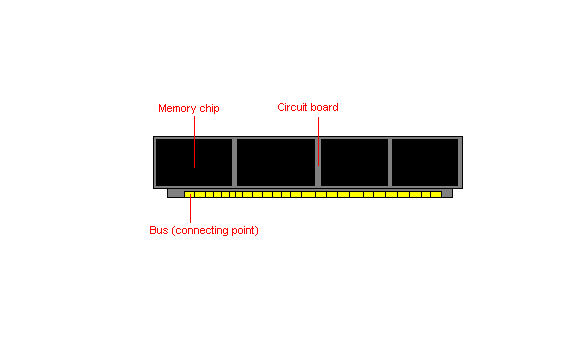
Now that you have some visual idea of what were talking about lets concentrate on what RAM does. RAM is basically your PC's thinking space. Your computer's 'hard drive' is a type of physical storage. If you turn off the computer's power what is saved to the 'hard drive' will remain. RAM is different in that what data or information exists in RAM is volatile. Anything contained in RAM during a power loss is gone.
This is not necessarily a problem because RAM has a completely different function than your 'hard drive'. RAM is basically the thinking area of your PC. Meaning as fast and efficient as your CPU is, it cannot read information directly from the 'hard drive'. Any information to be processed must first be read from the 'hard drive' or any other physical storage (floppy drive, CD-ROM) to RAM. Once data resides in memory (RAM) the information can be manipulated and shuffled around as needed.
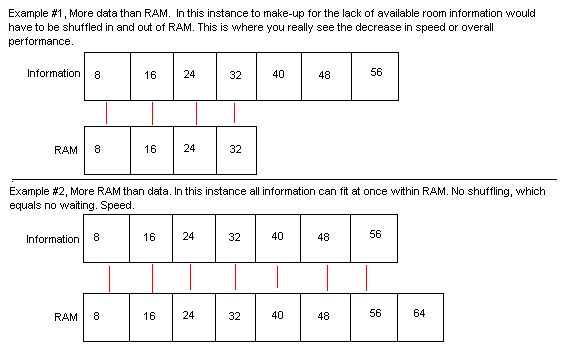
The amount of RAM a computer has installed can have a dramatic effect on the speed in which it operates. Here's an example:
 ,
,
There is no reasonable way to keep track of how much space your information will occupy vs. your available RAM. The moral of the story is in most situations the more RAM you have the faster your PC operates.
Back to Main Menu
Back to Homepage
