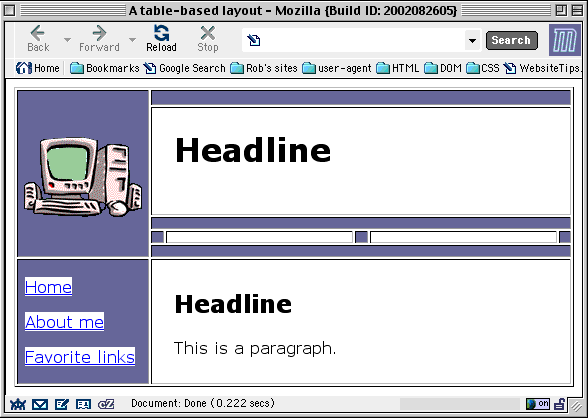
You’re almost done! All that remains is to change the text font to a “sans-serif.” The hyperlinks on the left also need a lighter background. It’s hard to read blue-on-blue!
Once upon a time we would have had to use <FONT> tags to change the text appearance. As for the hyperlink backgrounds, we would have had to either change the link colors — risking confusion for our users, who are used to blue “new” links and purple “used” links — or make images of both the “new” and “used” link text in the colors we wanted. Then we’d use JavaScript routines to make the images swap. Changing the link text would mean editing the text images again.
We will learn that JavaScript technique later. But for now we can accomplish everything we need with CSS. Just embed a stylesheet container in the document head (never in the body), like this:
    <STYLE type="text/css">
    <!--

        /* CSS rules will go here */

    -->
    </STYLE>
Here are the rules I chose to include in my stylesheet:
  body { font: normal normal 1em verdana,arial,helvetica,sans-serif; }
  a    { color: blue; background-color: white; }
  p,h1,h2 { margin-left: 5%; }
. . . And a few notes:
fontis a “shorthand” property. It packs in values forfont-style(normal, italic),font-weight(normal, bold, bolder),font-size, andfont-family. It’s simpler than typing in all those other property names.background-colorcan be applied to almost any element.margin-leftlets us create space between the table cell and the text inside it. (We’ll learn more about this later.) Before CSS, this was often done by embedding a one-row, two-cell table inside the cell and “clear-GIFfing” the left-hand cell:
|

I think you’ll agree that margin-left is simpler!


