
SAVING THE BACKGROUNDS • Right click on the mouse • Select "Save Picture as..." • Save it into your gallery or another folder that you keep BGs in PUTTING THE BACKGROUNDS ON AVs • Open the av your want to put the background on
 • Open up the background you want to use
 • Use the paint brush tool to paint over the parts surrounding the picture in the av
>>
• Use the paint brush tool to paint over the parts surrounding the picture in the av
>> >>
>> • Choose the flood fill tool
 • Click on the "Toggle Control Palette" button
 • Click on "Fill Style" and choose "Pattern"
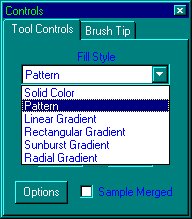 • Then click on "Options"
• Click on "New Pattern Source" and choose the BG that you opened
• Then click on "Options"
• Click on "New Pattern Source" and choose the BG that you opened • Then click "OK"
• Use the flood fill to paint the BG on the av
• Then click "OK"
• Use the flood fill to paint the BG on the av >>
>> • Then your done
HELPFUL TIPS
• Don't pick out avs that are too hard to use a BG on
• Don't use pixelated pictures, they never turn out good
• Make sure you have the picture on 24 bit (16 million colors) before you try to flood fill the BG on, if you don't u get an error saying "Gradient / pattern fills can only be performed on 24 bit or grayscale images."
• Then your done
HELPFUL TIPS
• Don't pick out avs that are too hard to use a BG on
• Don't use pixelated pictures, they never turn out good
• Make sure you have the picture on 24 bit (16 million colors) before you try to flood fill the BG on, if you don't u get an error saying "Gradient / pattern fills can only be performed on 24 bit or grayscale images."
