| If you want to learn more
about the people who run the Samurai
Pizza Cat world than you must download
these program to get in contact. |
ICQ is a program that
lets you keep a list of friend's and tells you if
they're online or not. Your friends must also
have ICQ for you to tell if there online and they
can tell of your online as well. Go to http://web.icq.com/ to learn more.
AIM is just like ICQ
but you get to organize your friend name's in
different folders and you get more control over
who wants to contact you over AIM, if some one is
bugging you just block them. It also has a virus
check on it for wend some one send you a file. Go
to http://www.aol.com to learn more.
IRC is like the web
but instead of surfing web site's you surf for
chat room channels. On the web you need a browser
to view web pages and on IRC you need a chat
program to get onto IRC. I use mIRC and it's a
good chat program so I trust it will be a good
chat program for you to. Go to http://www.mirc.com/ to download it and when your
done downloading come back to this web page and
I'll tell you how to get on the Samurai Pizza Cat
channel, "the funniest channel on
earth!" People there are friendly and they
may teach you some thing.
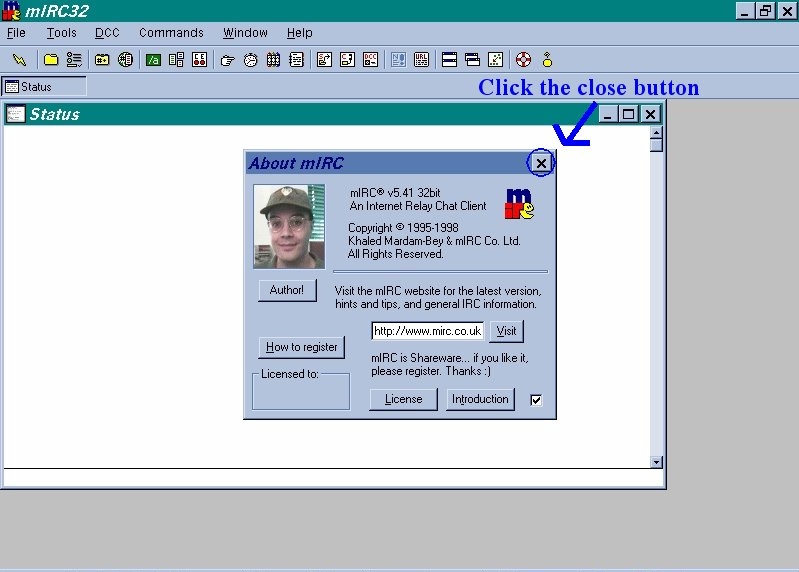
 When you run mIRC you
will see a box that will tell you who the
authors of this program are. "Click
the close box." When you run mIRC you
will see a box that will tell you who the
authors of this program are. "Click
the close box."
|
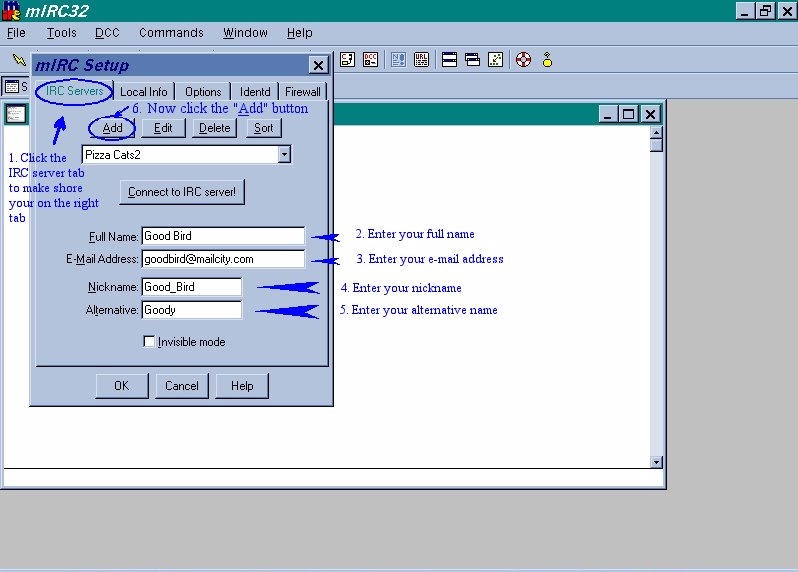
 The mIRC setup will
pop up "click the IRC server
tab" to make shore your on the right
tab. now enter your full name, e-mail
address, nickname (the name that will be
display in the chat room), and
alternative name (the name that you will
use in chat rooms if some one else is
using your name or if you have a ghost on
the IRC chat sever). Now "click the
add button". The mIRC setup will
pop up "click the IRC server
tab" to make shore your on the right
tab. now enter your full name, e-mail
address, nickname (the name that will be
display in the chat room), and
alternative name (the name that you will
use in chat rooms if some one else is
using your name or if you have a ghost on
the IRC chat sever). Now "click the
add button".
|
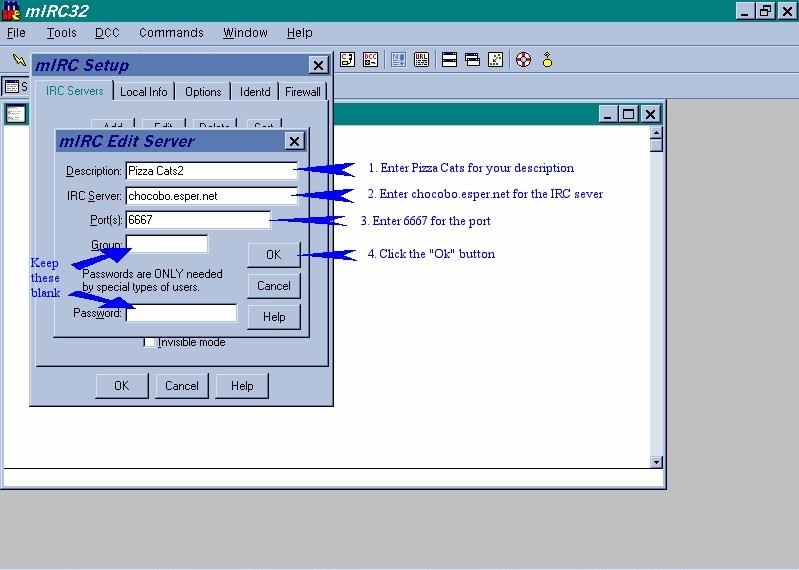
 The mIRC add server
setup box will pop up, enter Pizza Cats
for your description, enter
chocobo.esper.net for the IRC sever,
enter 6667 for the port, leave the rest
blank, "click the ok button." The mIRC add server
setup box will pop up, enter Pizza Cats
for your description, enter
chocobo.esper.net for the IRC sever,
enter 6667 for the port, leave the rest
blank, "click the ok button."
|
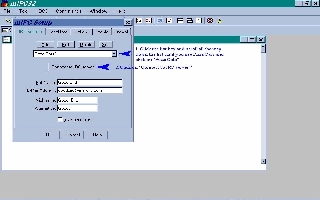 Now you should end up
back at the mIRC setup box, "click
the list box and scroll all the way down
the list until you see Pizza Cars (the
description of the sever you entered)
"click on Pizza Cats." Now
"click on Connect to IRC
server!" Now you should end up
back at the mIRC setup box, "click
the list box and scroll all the way down
the list until you see Pizza Cars (the
description of the sever you entered)
"click on Pizza Cats." Now
"click on Connect to IRC
server!"
|
 You will see allot of
words on your status box, wand the words
stop scrolling you will see the mIRC
channels folder box pop up. Enter
#samuraipizzacats in the "enter name
of channel to join" box, click add,
now scroll down the list of channel
name's till you see #samuraipizzacats in
the list of channels. "Click on
#samuraipizzacats," now "click
join". You will see allot of
words on your status box, wand the words
stop scrolling you will see the mIRC
channels folder box pop up. Enter
#samuraipizzacats in the "enter name
of channel to join" box, click add,
now scroll down the list of channel
name's till you see #samuraipizzacats in
the list of channels. "Click on
#samuraipizzacats," now "click
join".
|
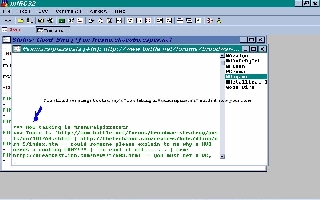 You should see a large
box that say's "now talking in
#samuraipizzacats" inside it, now
your done. You should see a large
box that say's "now talking in
#samuraipizzacats" inside it, now
your done.
|
|