| HowTo
Do a Screen Capture:
1.Full Screen Capture
On a PC:
To capture the entire screen simply press the Print Screen
button on your keyboard.. (At the top just to the right of the F12
button.) This places the entire desktop on the clipboard thus:
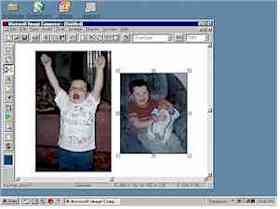
Simply paste it where you want it (i.e. in a Word Document).
To resize the image (as we’ve done here) while maintaining its aspect
ratio, click the image with the left mouse button to bring up the
resize handles (the small boxes at the corners). Press shift while
dragging any corner handle of the picture.
On a Mac:
Press shift + open apple + 3 at the same time.
The screen shot will be automatically saved on your hard drive as
picture 1.
2. Capture a Portion of a Screen
On a PC:
If you know a way to do this without a special software program let
us know. We ended up simply taking full screen shots and then using the
cropping tool inside Word to do this type of image.
On a Mac:
Press shift + open apple + 4 at the same time. A
cross hair should appear, +, and you can use it to draw around the area
you wish to capture. You should hear a camera shot sound when you
release the mouse. The image will appear on the hard drive as picture 1
etc.
3. Capture Just the Active Window
On a PC:
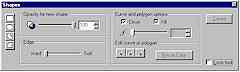
Press ALT + Print Screen simultaneously. This places
just the active window on the clipboard, rather than the entire screen
or desktop. Then you simply paste it into your document like so:
On a Mac:
Cry for help! We would really appreciate a Mac user who could fill in
these gaps for everyone.
Placing the Screen Shot in a Document on a Mac.
Open Simple Text or the program in which you wish to place the screen
shot. Open the file the image was saved to and open the picture. The
image will then appear in Simple Text on an untitled page. If you move
the cursor over it, a cross hair will appear. You can then draw a
selection box around the part of the image you want to include. Then
enter the edit menu and select copy.
OR
Go to the edit menu and click select all. A selection box will
appear around the entire image. In the edit menu and select copy.

|




