Crisfield, Maryland

Helpful Links
-Download the GPS waypoints for the six paddle trails around and through Jane's Island. at the OFFICIAL JANES ISLAND SITE -Take a look at this site. With GPS Visualizer, you can download the tracks from your day's paddling at Janes Island and make a map of your travels. This is the neatest thing I have seen in many a moon! Take a look at my new website, dedicated to the Civilian Conservation Corps camps in lower Worcester County, Maryland It is under construction but there is a lot of info on there.
Once you are committed to paddle the exterior parts of Janes Island, you are committed. If a thunderstorm or high wind comes up, you have nowhere to go.
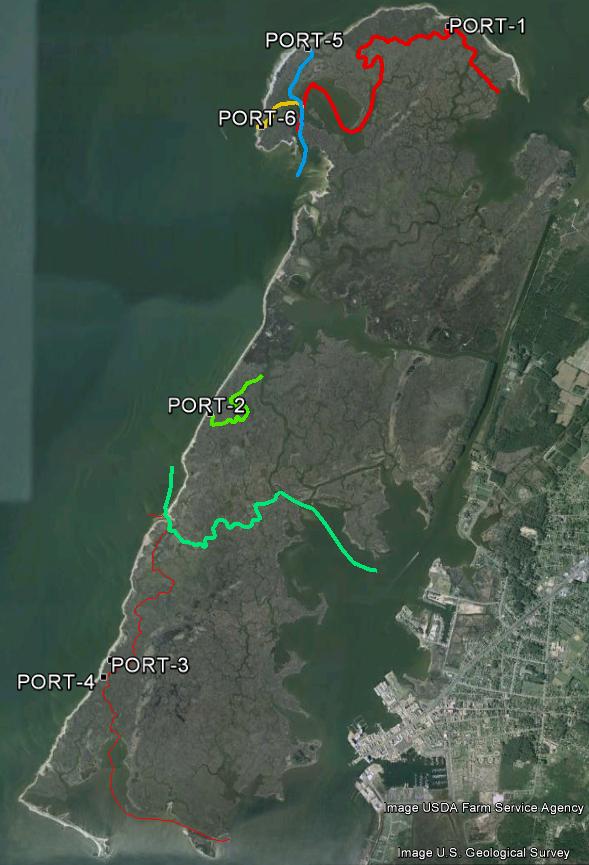
Until now. After spending a considerable amount of time studying the Google Earth aerial view of Jane’s Island, I realized that there are a number of creeks inside the Island that actually touch the beach surrounding the windward half. This means that if the weather turns bad, you at least have an option of portaging across the beach, and either paddling or holing up inside the Island.
The problem was, I had to chart a route from each of the several portages that actually went somewhere. This took some doing, and still isn’t done, to tell you the truth. I have mapped, and have published here, routes that will work. In most cases, they are the best routes, but I haven’t been able to confirm during how much of the tide cycle they are useable with a canoe or kayak.
Although they are not sponsored by the Maryland Park Service, you can download the new portage trails, plus a couple of others. NOTICE: Never paddle an unfamiliar tidal trail on a falling tide. I highly recommend not trying it the first time until at least two or three hours after low tide. If that works, you might try it earlier.
The point is, if you get aground, the tide will float you off. If you do it during a falling tide, you have several hours to wait.
Hopefully, you won't get marooned, but be on the safe side and make sure you have bug spray, water, and appropriate clothing. I also highly recommend taking a 6x9' or so lightweight tarp to protect you from the sun. A cell phone is nice, but in some circumstances a handheld VHF radio is better. Bring both.
These portages may or may not result in a shorter trip, probably not, but they are less exposed. The Tangier Sound area is notorious for quick and unpredictable weather changes; this way, hopefully, you can get out of jeopardy quicker.
At the present time, there are no plans to post the new signs with signs like the existing trails. Although things may change, most likely the new trail tracks will be available only here for a while, then perhaps on the official site. But who knows?
THE JANES ISLAND PADDLE TRAIL NETWORK
The paddle trails in and around Janes Island are posted with 12" x 18" reflective aluminum signs. Each trail has not only a different color sign but a distinctive shape, as well, e.g.: red octagon with a white reflective slash, black diamond, yellow equilateral triangle, brown square, green circle, and blue quadrilateral.
The trails all run from the Yellow Trail, north or south as the case may be, although you can certainly run it the other way if you wish. If you do though, you will be paddling opposite the directional arrows.
NOTE: These tracks and waypoints are also posted on the Maryland Park Service Website. We have had a lot of hits here, but that posting enables many more people to download the paddle trail information. Download the transfer file above and then upload it to your GPS. That way, even though you may never have paddled through the Park, you will be able to download waypoints, a simple trail map, etc. and use them in your GPS.
The navigational signs are accompanied by small, numbered paddle tour signs. You can pick up a free paddle tour brochure at the Park. Each sign is keyed to a natural, cultural, or historical fact in the brochure,
One of the neatest uses of a GPS is to just turn it on and allow it to record your position all day. Then, go home and download it, using EasyGPS. THEN, open it with Google Earth. You can look at where you went and any waypoints you marked, such as where you caught the big fish, saw the eagle, etc. You can also sent the file to your friends - sort of a tangible souviener of your trip.
Using the EasyGPS program, you can view a map of the Island, including waypoints and trails. If you click on a waypoint, you can link to TerraServer and see an aerial view of that part of the Island.
Use at your own risk, computerwise, GPS-wise, and navigationwise.
This site is dedicated to Jane's Island but is not sponsored by either the Park or the Maryland Park Service
If you would like to volunteer to try out the new portage trails, please contact one of the park rangers for further information.
-Download the waypoints from this site. I hate to admit it but the official page has a lot more to offer.
- EasyGPS -YOU NEED THIS free program to download the file to your computer.
NOW AVAILABLE!! - MORE PADDLE TRAILS.
Take a look at the Maryland Park Service's Jane's Island site. And while you're at it, look at all of Maryland's State Parks. It's an excellent idea to record the addresses of your favorite parks on your vehicle's GPS; it will likely be a big help when you head there on vacation. You can make your reservations online or by phone - the web site has the details.