^/\^ PeaK /\^/\

ATI 3D Hardware Reviews
Confused by all the 3D hype and where ATI stands
in the crowd. You are not alone. Here is a collection of links/articles
and reviews by industry leaders to help you sort out the issues.
1.1 Six-part Primer of
3D Chips/Boards
Read these articles first if you are a "newbie".
Simply put, 3D Hardware offers the possibility of more realism through
increased detail without the time lag.
1.2 Rage I Board Reviews:
Xpression
The 3D Xpression was one of the early low cost boards that combined traditional
2D Windows acceleration with 3D, smooth video playback of MPEG, TV-out
in a low cost package. This board used the original Rage I chipset.
1.3 Rage II Board Reviews:
Xpression+, 3D Pro Turbo, All-in-Wonder
The "+" symbolizes the use of the Rage
II chipset. It offers a speedup of about 2x
over the Rage I in 3D benchmarks. Note that higher performance boards,
such as the 3D Pro Turbo, with resolution up to 1600x1200 at high refresh
rates require higher speed memory subsystems such as SGRAM.
1.4 Rage Pro Board Reviews...Xpert@Work,
Xpert@Play, All-in-Wonder Pro
- ATI
and AGP 4th Wave...March 28, 1997
- Chipset
Offering4th Wave...April 14, 1997
- ATI
Pro Press Release ...May 19, 1997
- Xpert@Work
Spec Sheet ...All About Games
- PC
Magazine...first look on June 14,1997
- Microprocessor
Report...industry insider picks ATI Rage Pro as " best of the
bunch"...June2, 1997
- Gamespot
comparative review...Xpert@work
- John
Peddies Benchmark Page ...sadly out of date but I'll leave this bookmark here
- Webmeister Toms's "just the facts" summary
of 3rd Generation 2D
and 3dVideo...Nov
1997
- John
Peddies Benchmark results ...out of date
- Xpert@Play
review PC Magazine, Dec 97
- PC
World review for Dec 97
- Final
Reality A new Direct3D Benchmark from Euroupe
- Xpert@Work
Review by 3DGaming...Dec 2,1997
-
Kick Ass review of Xpert@Work/Play boards....Dec 17, 1997
- Review of 10 systems. Most used RagePro chipsets. Dec 1997.
- 1998 Reviews
CMP
Review and WinMag
Xpert@Work Review Jan 1/98 review
- Practical
PC Xpert@Work/Play Review... Jan 98
- PC
Mag Best of 97...AIW-Pro selected
- Mercury
Research WinBench 98 Results ...Feb 9, 1998... leader of the pack
- PC
Mags: RagePro vs i740 RagePro by a nose...Mar 11/98
- Games
Zero MagazineXpert@Play review....March 98
- PC
Mag, UK Editor's Choice: Xpert@Work...April 98
- PC
Direct...Xpert@Work used 7/10 systems in recent review of price/performance
conscience Euroupean Market ...april 98
- End
User Reviews...a bunch of related posts, reviews, testimonials, comments
by End Users. Page added April 10, 1998.
- Family PC review of AIW Pro in July 1998.
1.5 Rage 128 Excitement
- ATI
Rage 128 Chipsets Product and data sheet by ATI
- Rage 128 Boards Comparison
- Magnum: Workstation class version suitable for industrial OpenGL applications
for OEMs(32MB)
- Fury: same as above but with TV-out/32MB and games bundle.
- Xpert 128: Consumer version with 16MB of memory and TV-out.
- "Graphics for PC are all the rage"
For those who insist on technical gobledygook, Marily Quan of EE Times, Aug 27, 1998
- "ATI's Rage in the system "
Jim Davis of CNET gives a comparison of GL and VR chip versions
with a competitive analysis from Dean McCarron and Jon Peddie.CNET, Aug 27, 1998
- "Looking Ahead and not Looking Back" JPA editorial by Kathleen Maher, August 31, 1998
- "ATI announces the Rage 128"Early Winbench and OpenGL benchmarks plus
Ty Graham of Microsoft demo'ing DirectX 7.0 and ChromeEffects, Real-time
demos of "Rage Dawning" and "Any World" showing real-time morphing and
walk-thru's in 3D, Smooth DVD, and the worlds first Digital TV/Genlocked
ready images.
.Reported by Graeme Bennet of TCP, Sept 3, 1998
- MicoDesign Resources states "ATI Takes 3D Lead With Rage 128:
At a price that should put it into millions of popular PCs, ATI's new 3D accelerator provides impressive performance and more
consumer-oriented features than any other 3D chip so far"
- ATI FAQ on new Rage 128 chipset... Rage 128 product/chip
questions covering Xpert 128/Fury differences, GL/VR differences,
hardware/architecture advances, and
integrated DVD/MPEG-2 deocde.
- "ATI aims at the High End"
August 27 article by Gamescentre.com discusses the built in Hardware
for DVD with Microsoft Digital TV Evangelist Dave Marsh.
Rob Bicevskis discusses the power managed 0.25um technology that allows
performance without heat.
- Gamespot's first impression of beta silicon from
ATI's Rage Fury.
- PC World....Grace Aquino covers the product line.
- Electronic Buyer's News....Mark Hachman...remember Cable set-top
boxes ? Rage Pro technology will merge Internet and TV singals in
separate windows using a nice compact OS via Windows CE. ATI's
display solutions up through Rage 128 GL are discussed.
- Gamasutra...A Game developer magazine
mentions the ultra-thin driver layers and
the OnNow power down technology that allowed for a heatsink-less
and fan-less chip design. SGI has seen prototypes and offers
comments on ATI's fourth generation chip.
- RageOn 128 comments...
Cybertitan has a 3D centric description of the Rage128 features.
I have an animated GIF of various Rage 128 prototype boards but
need to clear this with ATI for release first...in
the mean time go to the above site for a preview of a small
low res GIF image of a prototype Rage 128 board. It is green
with the standard black patches and the dreaded
heatsink are nowhere to be seen :<)
- Computer Retail Week...
Kristen Kennedy discusses the 8 million transistors with
Phil Eisler of ATI and quotes Jon Peddie on the performance
positioning of the Rage 128 relative to VooDoo2 technology.
- Digital Producer Magazine article called "ATI Introduces Next-Generation RAGE(TM) 128 GL"
discusses bidirectional DME(direct memory execution) and the subpicture decoder.
- Canada Computer Paper "Rage 128 debut marks ATI's $1 billion year": aticle
covering the Rage 128 launch, Jeff Evans Oct 1998.
- "A closer look at the world's "fastest" graphics chip"
The Computer Paper's Graeme Bennet takes a closer look at the Rage 128.
November 1998.
- Super 7 Motherboard site takes a detailed look at the
Rage 128...the only card with driver support for all of
the following: DOS, Win3.1, Win95, Win98, NT 3.51, NT 4.0,
Mac OS and OS/2. Review can be found here
- @3D. A CAD professional
has some nice pics of the Rage 128. Preview forthcoming.
- PHS Euroupean Preview
translated to English. Block diagram and some sample images from
Rage Dawning . Oct 25, 1998
- Rage 128 Pre/Reviews
- Super 7 compatability has arrived....and title of best 2d/3d card
of 1998 Anand's review...I think
the kid will pull an all nighter...cheers!!! Related review of
AIW 128 on April 1, 1999.
- Heaven...Sharky's preview of heaven
on Dec. 9, 1999. Part 2 is a
Final Review
of the Rage Fury. Best color, acuity and sharpness seen in 2D, Feb 22, 1999.
Follow up review on April 1, 1999 on related AIW 128 Pro card.
- Mondo...Mondo...Marcia/Barry of Adrenaline Vault and
authors of the PC Upgrade and Repair Bible
do the right by the Rage 128.
Addendum
on February 26, 1998 with final
shipping product. The heat sink is not needed but nice.
- Alan of 3DGaming Rage 128 review.
Temporary home of 3DGaming and review is now at Standford
- "...kickes some major ass..." 3Dhardware review
- First impressions on Dec 10, 1998...Drop Vead Dorgeous!!!
Full review here. Final review on
March 5, 1999 is here. AIW 128 review on June 17, 1999.
- Lots of pictures and a review at RageOn by Kyle Strsbourg.
- Doctor Tom Pabst's review.
Seems like Tom's elbow is acting up...he seems very irritated in the review above...
Must be the valium he is taking. In the end it is just a video card and Xmas is just around the corner. Enjoy.
- Phil Rogers and Brian Hook talk about the 32-bit performance of
the Rage Fury.
- Gamers Depot: "...In both 2D AND 3D I have yet
to see a card that provides this level of image quality and detail...". Dec 1998..
Related review on AIW-128
- Alan Dang's Thesis on the Rage Fury. Initial preview
has been evloved to a full 5th generation review:
The first generation
reviews focussed on Windows 2D performance. The second generation reviews focussed on Framerate. Third
generation reviews have focussed on Framerate refinement and Quality. The Fourth generation reviews to date
have focussed on all of the above at higher resolution...Alan has expanded coverage to NT performance, NT
OpenGL stability and performance, defining various classes of DVD support and a real world test of choppiness
and the benefits of IDCT, 8-bit pallettized texture support for filmed sequences such as Final Fantansy, 32 bit
performance, heat/temperature/power measurements....etc.
Sister review of AIW 128 Pro/16MB review is here
- The Computer Paper Rage Fury preview
has success with the ALI Aladin V chipset. January 4, 1998
- Fullon3D AIW 128 Pro, June 14 1999.
. Sister review of Rage Magnum card
- Lost CIrcuit's Rage Fury review using the Micostar MS-5184
Super7 motherboard with VIA MVP3 chipset. Great results. January 7, 1998.
- Thresh's Firing Squad Rage Fury review
with updated driver to address AGP texturing turned off in earlier reviews.
January 22, 1998. Followup reviwew on March 10, 1999 on the Fury
- Fast Graphics's Rage Fury Review is just a bit longer
than a specification sheet. January 22, 1998...plus
Eric's
review of Final Xpert 128 on Pentium II 400 system. Feb 9, 1999.
- Review Zone's
Fury review has the 16-bit fuzziness
fixed. January 24, 1998.
- Ritualistic's Fury review runs Rage Dawning and says wow!. Feb 5, 1998.
- Leader of Mercury Research Benchmark pack on Feburary 8,1999.
- Freak runs the first ever Xpert128 review and has a blast. Feb 4, 1998
- ATI Invasion moved to ATI World with a review of the Final Fury on
a Pentium II 400 system. Comparitive benchmarks with TNT.
- ATI Rage 128 driver download
- Reactor Critical provides a insightful
comparative look into
3D architectural design.
- Kert's Rage 128 specification summary
- All the links here have been verified recently on
June 26, 1999. The Rage 128's performance
will be very similar across all products and for current performance with
current release drivers, one should read the AIW 128 reviews. Here is
a recent review from France on the
Fury on June 23, 1999...great architecture
that holds up to beyond 1024x768 (Q3) and definitely up to 1280 in Quake2
- Phil's Magnum and Fury review has been updated with Quake2 and
Forsaken benchmarks. Click here for a down to earth review
of the Rage Fury and what happens when it is pushed to 1600x1200.
- Concerned about Super7 compatability, read this review on
the AIW 128 run on an EPOX mothrboard.
- How about Rage 128 called in Orion in an Apple.
Benchmark review in a
Blue and White G3 and a
PowerMac 7500.
- Vu-net's May 1999 short take on the Rage Fury
- Maximum PC's Sean Downey May 1999 take of the Rage Fury earns it
a kick ass rating of 8 .
- Rage 128 shows up in
Gateway E-4200 desktop unit in PC Mag on June 2, 1999
-
- WinMag's July 99 Rage Fury takes of the new 3Dfx cards
and comes out sharper and with a better 3DMark.
- Apples OpenGL strategy with ATI and SGI
1.5 Rage 128 Pro
This chip is timed to coincide with the release of faster generation of
memory products aruond the 143 Mhz region.
and the high resolution flat panel support up to 1600x1200.
Advanced 3D features such as anisotripic filtering and AGP 4x round up
the list of improvements.
1.6 Sixth Generation RADEON Graphics Chipset
- ATI RADEON 256 Preview IXBT, April 25, 2000
- ATI's new Chip revealed A. Ajami/GameSpot
- ATI Press Release for RADEON April 24, 2000
- ATI's Radeon-Rage 6 revealed M. Chiappata et al/Hot Hardware, April 24,2000
- ATI's new Radeon 256 D. Pemberton/Gamer's Depot, April 24, 2000
- Radeon Graphics! Alan Dang/FiringSquad, April 24, 2000
- ATI Radeon 256 Overview T. Tokubo/GamePC, April 24, 2000
- ATI Radeon 256 Unveiled! Chris Angelini/Sharky's Extreme, April 24,2000
- Radeon 256 J. Cross/Computer Games Online, April 25, 2000
- ATI Radeon 256 Preview A. Shimpi/AnandTech, April 25,2000
- ATI speaks in Detail P. Cohen/MacCentral, April 2000
- Radeon Preview S. Orozco et al/Tom's Hardware, April 2000
- VooDooExtreme Radeon Review G. Soffer/VE, April 27,2000
The following are Production Radeon Reviews sorted alphabetically
by Hardware Site Name
-
ATI back in action: Radeon Ace's Hardware, John De Gelas, July 27, 2000
-
ATI Radeon 64 MB DDR Graphics Accelerator The Adrenaline Vault, Paul D. Sullivan, September 19, 2000
-
ATI Radeon 64MB DDR, Anandtech Matthew Witheiler, July 17, 2000
- ATI Radeon 64 MB DDR Graphics Accelerator
Avault, Paul D. Sullivan, September 19, 2000
-
ATI Radeon 64Mb DDR Chick's Hardware Chick Cheung, August 30, 2000
-
The ATI Radeon 64Mb DemoNews, August 10, 2000
-
ATI Radeon 64 MB DDR - Review Fast Graphics, Eric Van Ballegoie, July 25, 2000
-
Windows 2000 Video Card Roundup FiringSquad, Sarju Shah, September 1, 2000
-
FSAA Comparison: V5 vs. Radeon FiringSquad, Sarju Shah, August 02, 2000
-
ATI Radeon 64Mb GA Hardware, Eric Lizotte, July 17, 2000
-
ATI 64 MB DDR Game PC, Todd Tokubo, August 11, 2000
-
ATI Radeon 64MB DDR GameCenter, Joel Durham Jr, July 19 2000
-
ATI's new Radeon - Final Release Gamer's Depot, Duane Pemberton, July 17, 2000
-
ATI Radeon 64MB DDR SDRAM GameSpy, Craig Companaro
-
Ati Radeon 64MB DDR VIVO Display Adapter GotApex, Darth, Sept 18, 2000
-
ATI's Radeon, the Beauty of the Beast Hardware Central, Sander Sassen, 2000
-
ATI Radeon 64MB Hartware.net/English Translation ,Franc Schraeer, 2000
-
ATI Radeon 64 Meg DDR OEM Review Hexus.net, Robert Irwin, 2000
-
The ATI Radeon Experience Hot Hardware, Marco Chiapetta, July 17, 2000
- Radeon Review I_am_a_geek,John August 14, 2000
- ATI AIW Radeon 32 MB DDR
MS, Lost Circuits, November 11, 2000.
- Hardware Preview: Radeon The Meter, July 17, 2000
- Radeon Review One PC, Mindsoup, Sept 21, 2000
- Radeon review Overclockers Online, Steven Van Eycken, Nov 13, 2000
-
ATi Radeon 64MB DDR SDRAM Hands On Test Planet Hardware,Craig Companaro, July 17, 2000
- ATi Radeon Tested on AMD Platforms Planet Hardware, Kevin Barton, July 19, 2000
- Planet Hardware,
ATi Radeon & NVIDIA GeForce2 GTS Screenshot Comparison July 19, 2000
-
Overclocked ATi Radeon vs. Overclocked GeForce2 GTS Planet Hardware, Craig Companaro, July 20, 2000
- ATI RADEON 64 MB DDR Review Unique-PC, August 23, 2000
- ATI RADEON 32MB SDR Rage3D/Kbench.com , 2000
- ATi RADEON - The Empire strikes back Rivastation, Benjamin Kraft, 2000
-
ATi Radeon 256 32MB DDR video card review 1.0 Savage News, Mike Nero, August 23, 2000
- ATI Radeon 32MB DDR Review Sharky Extreme, Chris Angelini, September 2000
- ATI Radeon 64MB DDR Guide Sharky Extreme, July 17, 2000
- Sharky's Value Video Card Round-up Sharky Extreme, October 2000
- ATI's new Radeon-Smart Technology meets Brute Force
Tom's Hardware Site, Tom Pabst/Silvino Orozco, July 17, 2000
- Update: ATI's Industry shaking Radeon revisited
Tom's Hardware Site, Silvion Orozco, July 21, 2000>
- ATI Radeon PC Magazine UK, Cliff Joseph
Recent Radeon Reviews
For those of you who have never owned ATI or have just discovered the Radeon family from
friends, knowlegeable, dealers or shows, read the about this classic review
by Sharky's Extreme comparing current generation 3D video cards in their
Value Video Card Roundup.
Find out more by reading the reviews above and the reviews below which see why
the Radeon fever has been catching. It is now the number one retail video brand.
- Which Graphics Card Should I buy...some advice from Jarreth Hather/GA-Hardware
- Video Shootout
Review Zone/Dinusha, Oct 13, 2000
- ATI Radeon Review..."love those beta 7020 drivers"...HardwareOC/B. Palmer, Nov 29, 2000.
- Maximum PC 64MB Radeon Will Smith..."Kick Ass" rating in October, 2000
- Radeon 32MB Long Term Look..."stunning 2D quality"...Radeonic/Wayne Booker, December 2, 2000
- ATI Radeon 32 MB SDR review..."I've never seen such a warm, bright, and clear picture before...", Bench-house/Peca, Dec. 13, 2000
- AIW Radeon 32MB DDR Review..."crystal clear quality"...Sharky's/Chris Angelini, Jan 9, 2001.
- Radeon Roundup..."clearly the best image"...PC Monkey, Jan 2001
- Radeon Tome..."we're not worthy"...Fullon3d/Tom Monkish, Feb 15,2001
- The Radeon Experience
...I once owned TNT, TNT2 and GF2",April 4, 2001
- Radeon LE Graphics Card Review
(X-bit Labs, March 17, 2001)and what you should know about rebranded
Nvidia MX2 chips
- Working on two Fronts:Radeon VE..."dual monitor support with MX
kicking performance", Tom's Hardware, March 16, 2001.
- Radeon VE...a good overview of the Radeon family", Andrew Worobyew/Digit-Life,March 28, 2001,
- ATI Radeon LE 32MB DDR...a budget version of the 32MB DDR card with a secret weapon...Anaadtech, Mathew Witheiler, May 23, 2001.
1.6 Optimizing 2D
~
Human factors engineering by the "big" guy has resulted in us having
a number of built in eye processing algorithms. We have very good
sense of changes near the periphery of our sight to warn us against
impending danger. The down side is that as monitors get bigger and begins to
occupies
more of our peripheral vision. The result is that we notice refresh rate
more readily and the headaches/eyeaches begin to to tell us that
things are not exactly right.
The combination of big screens and high refresh rates combine to
produce pixel clocks higher than the FM carrier (350Mhz vs 108 Mhz).
Another closely related quirk is our sensivity to pacing whether it be audible
or visual. The human brain has an amazing internal time clock
that can perceive minute "deltas" or changes. It is this that
allows to appreciate a virtuoso violinist solo but to also be
senstive to variation in framerates. It is far better
(my opinion) to aim
for slightly lower but more stable frame rates as found in
Radeon products. Benchmarking using the "biggest" number
should also become by the standard deviation...bring out your
statistics books.
3D image vibrancy or just plain better looking games...is there
a secret? The Radeon was conceived to manipulate information accurately.
The term image quality is a confusing one which is also a product of
2D quality that can be judged using programs making heavy use
of text such as WORD and EXCEL. In the 3D world, when 32 bits of colour
depth is used, acceptable roundoff error in the 16 bit world by
using mathematical approximation (Taylor series approximations
of sine, cos and exponential functions) are not as acceptable.
The Radeon chip contains a math accurate
IEEE-754 computation unit. Can this accuracy be determined ? Yes, it turns out as we can
compare the math unit in the graphics chipset to the one in the CPU.
In a recent roundup, the Radeon proved to have the most accurate
graphic computation unit.
If you examine the graph above, you will notice that the 2D text
quality is just a shade below top notch. There will be a facility
within a future driver release (post 7049) to allow the user to "dial in"
the 2D quality to account for issues dealing with the following:
- Variable noise of power supplies found in computer cases
- Motherboard regulation
- Impedance mismatch of cables and monitor termination
Different combinations of power supplies, motherboards, and cables may
or may not see any problems with the same monitor.
The current Radeon tradeoffs have been design to account
for this interaction with a wide variety of systems but
tradeoffs need to be made for some monitors.
To resolve this, a user enabled option will be provided
in the driver to select slower edge rates to accomodate non optimal cable/monitor interfaces. There may be some small tradeoffs in resolution for
fast tracking (very high bandwidth) monitors.
The user can choose the setting that best
suits his system. It is all to do with effectual sets of priorities and tradeoffs. Again,
both modes have their advantages...it is up to the user to decide what
works in his particular system.
If you examine the chart above and rethink the ranking process, a card
with the best performance but a blank screen should get a "0" score...it
is not a graphics pipe to your eye. With this in mind, you can
- Take the scores in each column and ignore the video score to get a score out of 90.
- You can then take this score and multiply by 10/9 to get a score
out of a 100%. This number does not take 2D Video Quality into account.
- The last thing to do is take video quality in effect by
multiplying the above result by "2D Video Quality"/10.
So what are the modified rankings and score when this is done ?
| Rank |
Card |
Score |
| 1 |
ATI 32MB DDR |
78.5/100 |
| 2 |
ATI 32 MB SDR |
75/100 |
| 3 |
Matrox G450 |
68.3/100 |
| 4 |
Elsa Gladiac MX |
68/100 |
| 5 |
Herc Prophet II MX |
57.2/100 |
| 6 |
Leadtek GeForce2 MX |
56.8/100 ** tie |
| 7 |
MSI 816 |
56.8/100 ** tie |
| 8 |
3dfx Voodoo4 4500 |
56/100 |
So if you want the best GeForce2 MX chipset based card...take the ELSA version.
This seems to line up better with the tone of the reviewer's subjective comments. Ever wonder why Matrox has such a following...look no futher
than this modified table....but the Radeon cards stand a shoulder
above the rest and this explains why it is presently the best selling
aftermarket upgrade graphics card.
Summary of Shimmering:
1) The following is a rough summary of guidelines to help people sort out 2D shimmer. 95% of systems are fine but some system
exhibit a slight shimmer. Thanks to Eman for beta testing (as well as others on this forum), Ichneumon for the GIF,
and Gia for the coding the original beta patch. Some users have seen immense improvements and others have seen little.
In those cases, I have to look elsewhere for the problem. Some hints are suggested below.
2) 2D artifacts can be due to
a combination of system issues and/or
interaction
of power supply noise,motherboard regulation, crosstalk between separate guns,cable mismatch
between the cable itself and the monitor termination. BNC cables can help in two of the areas.
3) The current driver D7.16 release of drives have a facility to alter the characteristic of the DAC.
Driver Locations: ftp://ftp.microsoft.com/services/whql/drivers/winme/disply/a256651.exe http://www.microsoft.com/hcl ul TYPE=SQUARE>
->set search string to "radeon"->English Ver. D7.16-1114M-102C-ATI
4) There are also 7041 "leaked" drivers floating around whose build and origin is of unknown quallity. They are reputed to be the same or similar to the D7.16 drivers. Use at your own risk. You can check the file information by doing the following:
My Computer->properties(right click)->Device Manger->Display Adapter ->Radeon->Driver-Driver File Details.
It should say something like:
D7.16xxxxxxxxxxxxx
5) Add registry:
- Run regedit and expand the folders starting from HKEY_LOCAL.
- Go to the DAL folder and double click it, then add the following
registry key called
HKEY_LOCAL_MACHINE\Software\ATI Technologies\
Driver\xxxx\DAL\GCOOPTION_SlowerEdge
and make a new variable of type DWORD called
GCOOPTION_SLowerEdge with a value of "1".
xxxx represents adapter "number" which is assigned by Windows.
- To add a registry key,first, click the edit menu, click on the
"new" icon.
You will be queried
for the type of the variable you are creating.Choose DWORD value.
- Fill in GCOOPTION_SlowerEdge. Give a value 1.
If you have correctly edited the registry
it should look like the following
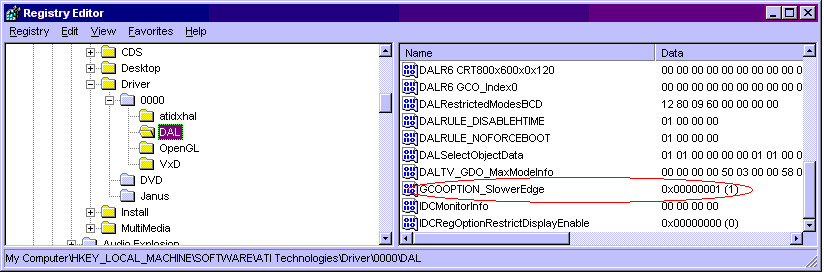
- Reboot and tell me if the 2D looks better.
- Fill in GCOOPTION_SlowerEdge. Give a value 0.
- Reboot and tell me if the 2D looks worse.
- Keep the value that makes your 2D look best.
2.0 Comparison of 3rd Generation
Video Chipsets
As much as I would love ATI to be the the hardware that
everyone uses, there are other companies out there that compete for your
dollar. I have included the actual html code of Johnathan Greenberg's Greenberg's
editorial
here for archival reasons as these pages tend to dissapear.

Email: rchau@angelfire.com| HOME